Facebook Ads for SaaS: The 8-Step Meta Ads Strategy
 Vishnu Prasadh
Last updated on
Facebook ads for SaaS is the practice of using paid ads on Facebook to put a software product in front of the people likely to buy it, then bringing them back with retargeting until they start a trial or book a demo.
Think about who actually buys software for a 12-person plumbing company. It’s usually the owner, and they’ve probably never filled in a job title on LinkedIn, but they’re on Facebook most evenings and on Instagram while they wait for a supplier, which is why Meta deserves a proper look for a lot of B2B products. I’ve written this for SaaS founders, growth leads and paid media managers who already run Google, maybe LinkedIn too, and want to know whether Meta will work for them and how to set it up without burning the first few months of budget.
The 8-Step Facebook Ads Playbook for SaaS at a Glance
- Set up the Pixel and Conversions API first: Track trials, demos and CRM stages server-side so Meta learns from the leads that turn into pipeline.
- Build audiences from your own data: Seed lookalikes from active customers, retarget site visitors and video viewers, and give Advantage+ those audiences as suggestions.
- Keep the account structure lean: Run one prospecting campaign and one retargeting campaign, so each ad set gets enough conversions to learn.
- Pick the conversion event for your motion: Optimize for activated trials if you’re product-led and qualified demos if you’re sales-led.
- Make creative do the targeting: Show the product in short demo videos, name who it’s for in the first line, and test new angles every week.
- Match offers and pages to each stage: Give cold audiences something useful, warm ones a case study or tour, and only the warmest a trial or demo.
- Set your budget from reach and cost per lead: Work out what it costs to reach your audience often enough, then check the cost per qualified lead makes sense.
- Measure lift and pipeline: Track brand searches, trials and demos from your industries and CRM pipeline, because Meta rarely gets the last click.
What Is Facebook Ads for SaaS?
Facebook ads for SaaS are Meta ad campaigns that software companies run on Facebook and Instagram to reach likely buyers, using their own customer and visitor data to find them and judging the results on trials, demos and pipeline.
You’ll hear people say Facebook ads and Meta ads, and they mean the same thing. Meta ads for SaaS all run from one place, Meta Ads Manager, and the same campaign can show on Facebook, Instagram, Messenger and Meta’s Audience Network of partner apps. In this guide I’ll say Facebook ads most of the time, because that’s still what most people call them.
The question I get early on is whether Meta can replace Google Ads, and the short answer is no. Someone searching “plumbing scheduling software” on Google already knows they need it, and your search ad catches them right then. Nobody on Facebook is shopping for software, so a Meta ad is there to make sure that when the owner finally gets fed up with the whiteboard and the missed callbacks, your name is the one they search.
The Facebook Ads Terms You’ll See in This Guide
| Term | What it means |
|---|---|
| Business Manager (Meta Business Suite) | Where your ad account, Facebook Page, Pixel and team access live |
| Ads Manager | Meta’s tool for creating and running ads across Facebook, Instagram and Messenger |
| Meta Pixel | Code on your website that tells Meta who visited and what they did |
| Conversions API | A server-side connection that sends events like trials, demos and closed deals to Meta, even when the browser blocks the Pixel |
| Custom Audience | An audience built from your own data: customer lists, site visitors, video viewers or people who opened a lead form |
| Lookalike Audience | New people Meta finds who look like one of your Custom Audiences |
| Advantage+ audience | Meta’s default targeting, where your audiences are treated as suggestions and Meta can go beyond them |
| Learning phase | The period after launch or a big edit when Meta is still working out who to show an ad set to |
| Attribution setting | How long after a click or view Meta counts a conversion as its own |
| Instant form | A lead form that opens inside Facebook or Instagram, pre-filled from the person’s profile |
| CPM | What you pay for 1,000 impressions |
| Frequency | How many times, on average, each person saw your ads |
| Placements | Where your ads show: Facebook, Instagram, Messenger or the Audience Network |
| Advantage+ placements | Meta’s default setting that spreads your ads across every placement where they’re likely to do well |
When Are Facebook Ads Worth It for SaaS?
Facebook ads for SaaS are worth it when your buyers spend time on Facebook and Instagram, your product is easy to understand from a short video, and you can retarget people over a few weeks until they’re ready for a trial or a demo.
A lot more B2B companies fit that than you’d expect, though not all of them, so here’s how I’d think about it by the kind of company you are:
| Your company | Are Facebook ads worth it? | Why |
|---|---|---|
| Selling to small businesses, like trades, clinics, restaurants or agencies | Yes, often your best paid social channel | Owners rarely keep a LinkedIn profile current, but most of them are on Facebook and Instagram every day |
| Product-led, with a free trial or freemium plan | Yes | Meta can optimize for trial starts directly, and a short product video is often enough to get someone to try it |
| Mid-market, selling into a clear industry | Yes, mainly for lookalikes and retargeting | Lookalikes of your customers and retargeting your site visitors keep you in front of the right companies for much less than LinkedIn |
| Enterprise and sales-led, selling to a narrow group of decision-makers | As support, with LinkedIn leading | Meta’s job and employer targeting is much looser than LinkedIn’s, so use it to retarget people who already know you |
| Before product-market fit | Not yet | Lookalikes need customers to copy and ads need a message you know works, and you won’t have either yet |
So Facebook ads for B2B SaaS can work very well, but who you sell to matters a lot more than it does on LinkedIn. If your buyer is a VP at a 5,000-person bank, start with LinkedIn and use Meta to retarget. If your buyer is the owner of an HVAC company, it’s likely the other way round.
Contract value plays into it too: at a few thousand dollars a year, like our field-service example, Meta’s cheaper reach is often what makes paid social affordable at all, and at an ACV of $50,000 or more, LinkedIn’s precision usually earns its higher cost.
How Do Facebook Ads Compare With LinkedIn and Google for SaaS?
| Facebook and Instagram | Google Search | ||
|---|---|---|---|
| How you reach people | Your own customer and visitor data, lookalikes, interests | Job title, company, industry, seniority | The words people search |
| What people are doing | Scrolling in their own time | Scrolling at work | Looking for a solution right now |
| Cost per impression | Usually the lowest of the three | Usually the highest | You pay per click instead |
| What it’s best at | Reaching small-business owners and prosumers, and retargeting | Reaching named roles at named companies | Catching people who already want what you sell |
| How to judge it | Reach, lift and qualified trials or demos | Reach, lift and pipeline from target accounts | Qualified leads and pipeline |
The way I’d usually set up a SaaS PPC program is Google first, then one of these two for reach, and which one comes down to where your buyer spends their evenings.
How to Build a Facebook Ads Strategy for SaaS in 8 Steps
To build a Facebook ads strategy for SaaS, set up the Pixel and Conversions API, build audiences from your own data, keep the structure lean, optimize for trials or demos, let creative do the targeting, match offers to each stage, budget from reach and measure lift.
To keep it concrete, I’ll use one example the whole way through: a scheduling and invoicing app for plumbing, HVAC and electrical companies with 5 to 50 staff. The owner or the office manager usually buys it, it costs about $3,000 to $6,000 a year, and it has both a free trial and a demo.
| Step | What you do | Where you do it |
|---|---|---|
| 1. Pixel and Conversions API | Track trials, activation, demos and CRM stages | Events Manager, your CRM |
| 2. Audiences | Build Custom Audiences, seed lookalikes, set up retargeting | Ads Manager, Audiences |
| 3. Structure | One prospecting campaign, one retargeting campaign | Ads Manager |
| 4. Conversion event | Pick activated trials or qualified demos | Ad set, conversion location and event |
| 5. Creative | Short product videos and proof, with a few new angles each week | Ads Manager, Meta Ad Library for ideas |
| 6. Offers by stage | Useful content cold, case studies warm, trial or demo hot | Your site and lead forms |
| 7. Budget | Work out reach and frequency, then check cost per lead | A spreadsheet and Ads Manager’s estimates |
| 8. Measurement | Brand searches, trials and demos from your industries, pipeline | Search Console, GA4, your CRM |
Step 1: Set Up the Meta Pixel and Conversions API
Before you spend anything, Meta needs to see the moments that matter to you. If the only thing it can see is a page view, it’ll get very good at finding people who view pages. Here’s what I’d have ready first:
| What to have ready | Why you need it |
|---|---|
| A Business Manager (Meta Business Suite) with your ad account and Facebook Page connected | Everything else lives inside it |
| The Meta Pixel and the Conversions API | Meta learns from what happens after the click |
| Your CRM stages mapped to events (trial, demo, MQL, SQL, closed won) | So Meta and your CRM count the same things |
| 3 to 5 creatives, at least one of them a short product video | Meta needs a few ads to compare from day one |
| One proof asset, like a customer story with real numbers | It’s what you’ll show people once they’ve engaged |
| An offer for people who’ve never heard of you | Cold audiences rarely book a demo from one ad |
The Pixel tracks what happens in the browser, and the Conversions API sends the same events from your server or your CRM, which fills the gaps when someone’s browser blocks tracking. You don’t need a developer for most setups: HubSpot’s Meta integration can send lifecycle stage changes back on its own, other CRMs like Salesforce usually connect through a third-party connector, and Meta’s Conversions API Gateway handles the website side. Then decide which events you send:
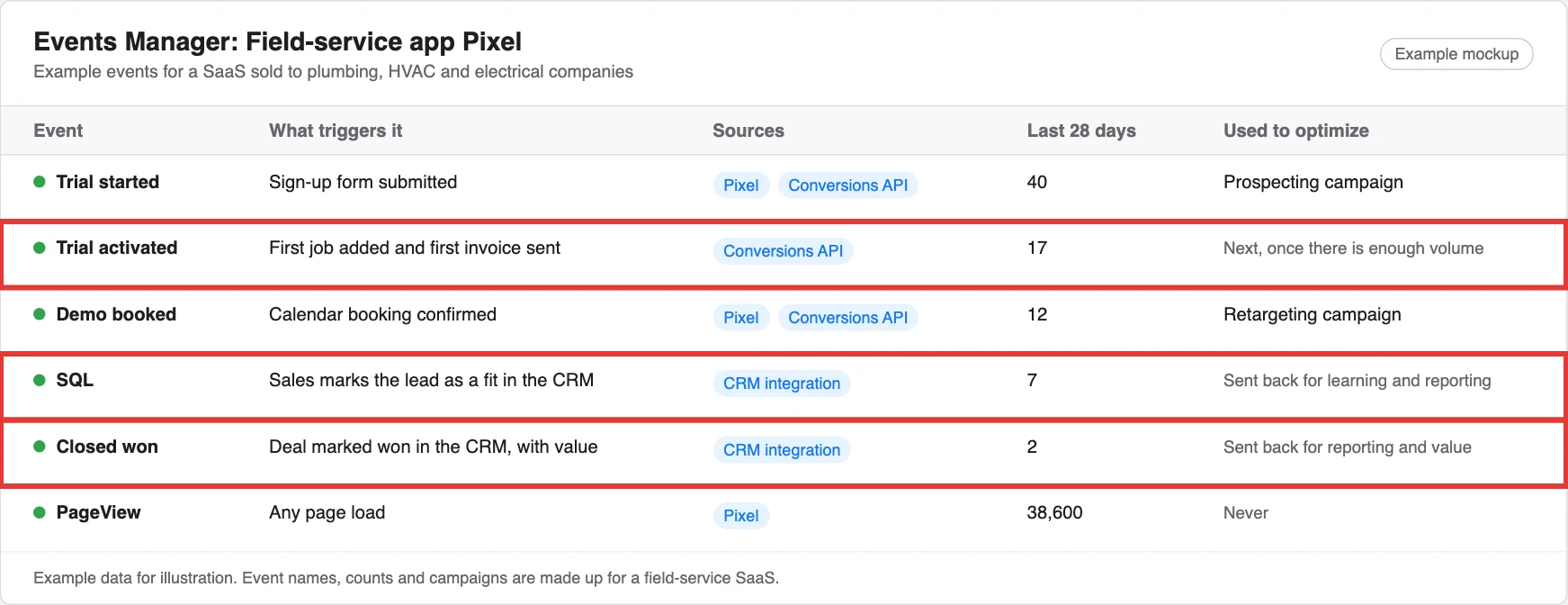
| Event | Example for the field-service app | Do you optimize for it? |
|---|---|---|
| Trial started | Owner signs up for the free trial | Yes, if you’re product-led and get enough of them |
| Trial activated | They add their first job and send their first invoice | Yes, once you have the volume, because it’s a much better signal than a sign-up |
| Demo booked | Office manager books a call | Yes, if you’re sales-led |
| MQL and SQL | Sales marks the lead as a good fit | Send it back so Meta can learn from it |
| Closed won | They become a paying customer | Send it back for reporting and value |
Then check your attribution setting, which is how long after a click or view Meta will count a conversion as its own, and for most SaaS accounts I’d leave it on 7-day click and 1-day view. Meta doesn’t report longer view windows, so expect it to show fewer conversions than your CRM does, and read the full pipeline there.
Here’s what that event list might look like in Events Manager for the field-service app. The boxed events are the ones that come from after the sign-up, which only the Conversions API and your CRM can send.
Step 2: Build Audiences From Your Own Data
Meta’s targeting has moved a lot in the last few years, and the old approach of stacking interests and job titles works far less well than it used to, so the best signal you have now is your own data. You’ll build three kinds of audience, and each one does a different job:
| Audience | Who’s in it | Which campaign uses it |
|---|---|---|
| Lookalikes | New people who look like your best customers | Prospecting |
| Retargeting | People who already know you | Retargeting |
| Advantage+ suggestions | Your lookalikes and customer lists, used as starting points | Prospecting |
Seed Lookalikes From Your Customers
A lookalike tells Meta to go and find more people like the ones who already pay you. This is how I’d build one:
- Export your best customers: Pick the ones who stuck around and use the product, rather than everyone who ever signed up.
- Add phone numbers and personal emails: Most CRMs are full of work emails, but most people sign up to Facebook with a personal email, so a list of work emails often matches badly.
- Check you’re allowed to use them: Only upload contacts your privacy policy covers for advertising, and Meta hashes the list before it matches anything.
- Build a 1% lookalike: It’s the closest match and the place I’d start. Meta needs at least 100 people from one country in the list, and in practice a few thousand gives it far more to work with.
- Seed from intent if your list is small: If you only have, say, 60 customers, seed from a bigger group that still shows intent, like everyone who started a trial or visited your pricing page. Switch back to customers once you have a few hundred.
Real Client Story
One of the best Meta campaigns our team has run was for a fintech SaaS client. It was a lead-objective Facebook campaign built on a 1% lookalike of their active users, and it averaged around 15 leads a week, which made it one of the strongest Meta results we’ve seen. The audience did most of the work there, because a lookalike of people already using the product told Meta exactly who to look for, and broad interest targeting has nothing like that signal.
Build Your Retargeting Audiences
These are the people who already know you, and they’re usually your cheapest trials and demos:
- Site visitors: Everyone from the last 30 to 90 days, with the pricing and demo pages as their own audience.
- Video viewers: People who watched at least half of a product video.
- Lead form openers: People who opened an instant form but didn’t submit it.
- Page and profile engagers: People who engaged with your Facebook Page or Instagram profile.
- Trial users who didn’t activate: People who signed up but never added their first job.
Where Advantage+ Audience Fits
Advantage+ audience is now Meta’s default, and it leans toward broad targeting by treating the audiences you give it as suggestions, so Meta can show your ads to people outside them if it thinks they’ll convert. That works well when Meta has a good conversion event to learn from, which is why the first step matters so much. For a B2B product, I’d give Advantage+ your lookalikes and customer lists as suggestions, and keep location and your customer exclusions as hard controls. Then, after a couple of weeks, check where the trials are actually coming from, and if they’re clearly outside your market, tighten your conversion event before you try to tighten the targeting.
Step 3: Keep Your Campaign Structure Lean
The easiest way to slow Meta down is to split a small budget across too many campaigns, because every ad set needs conversions to learn, and eight audiences sharing one budget means none of them ever gets there.
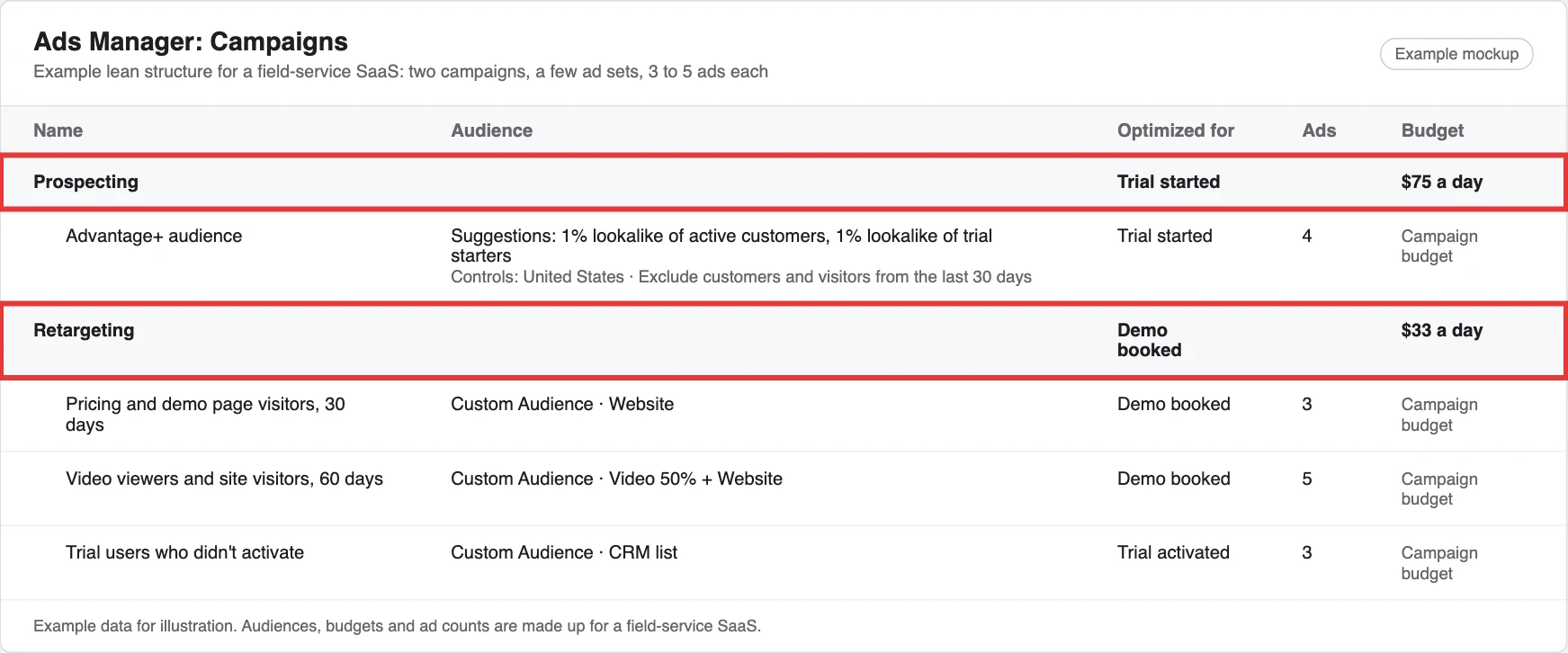
For most SaaS companies, two campaigns is enough to start:
| Campaign | Who’s in it | What you show them |
|---|---|---|
| Prospecting | Advantage+ audience with your lookalikes as suggestions, excluding customers and recent visitors | Short product videos, founder-led videos and customer proof |
| Retargeting | Site visitors, video viewers, lead form openers and trial users who didn’t activate | Case studies, product tours, and the trial or demo offer |
This is the whole account for the field-service app, with the two campaigns boxed. Prospecting runs one Advantage+ ad set, and retargeting splits people by how warm they are.
Then a few settings apply to both campaigns. People often ask whether they should run on Instagram too, and the placements row answers that:
| Setting | What I’d do | Why |
|---|---|---|
| Ads per ad set | Keep around 3 to 5 running at a time | It gives Meta enough to compare without spreading the spend too thin |
| Placements | Leave Advantage+ placements on, so ads can show on Facebook, Instagram, Messenger and the Audience Network, then check the placement breakdown after a couple of weeks | If the Audience Network sends clicks that never turn into trials, switch it off for that campaign |
| Learning phase | Aim for around 50 conversions per ad set within a week of launch or its last big edit | If you’re nowhere near that, merge ad sets or optimize for an earlier event like trial starts until you have the volume |
| Edits | Avoid big edits while an ad set is still learning | Each big edit restarts the learning phase |
Step 4: Optimize for Trials or Demos
What you optimize for decides who Meta goes looking for, so pick real pipeline events that match how you sell, because if you optimize for cheap PDF downloads or form fills, Meta will find you plenty of people who download PDFs and fill in forms. Here’s how I’d set it up for the field-service app:
| If you’re… | Optimize for | Send people to | Watch out for |
|---|---|---|---|
| Product-led | Trial started, then activated trial once you have the volume | A short sign-up page | Sign-ups who never come back |
| Sales-led | Demo booked, or an SQL sent back from your CRM | A demo page or an instant form | Cheap leads sales won’t call |
| Both | Trials for prospecting, demos for retargeting | Different pages for each | Two offers in one ad |
Instant forms get you more leads because they’re pre-filled from the person’s profile, but some people submit them without thinking, so if you use them:
- Pick the higher intent form type: It adds a review step before the person submits.
- Ask one or two qualifying questions: Something like how many technicians they have.
- Sync the form to your CRM: That way someone can call the same day, while they still remember filling it in.
Step 5: Use Ad Formats and Creative to Do the Targeting
With SaaS Facebook ads, your creative does a lot of the targeting, because you can’t pick “HVAC company owners” the way you’d pick a job title on LinkedIn, so the ad itself has to make the right people stop and the wrong people scroll past.
The Best Ad Formats for SaaS
| Format | What it’s good for | Example for the field-service app |
|---|---|---|
| Product demo video | Showing the workflow in 15 to 30 seconds, shot vertical for Reels and Stories | A job going from booked to invoiced on a phone |
| Founder-led or UGC-style video | Trust, from a real person talking to camera in a Reels-style clip | An HVAC owner explaining how they stopped losing callbacks |
| Carousel | Walking through features or a case study, card by card | Schedule, dispatch, invoice, get paid |
| Static image with social proof | A customer logo, an ROI result or a review, for retargeting | “Paid 9 days faster” with the customer’s name and logo |
| Instant form | Demo or trial requests from warm audiences | “Book a 15-minute walkthrough” |
If you don’t have video, don’t let that hold you up, because a screen recording of the product on a phone, with captions, is often enough to start with and usually looks more real in the feed than a polished advert.
Real SaaS Ads From the Meta Ad Library
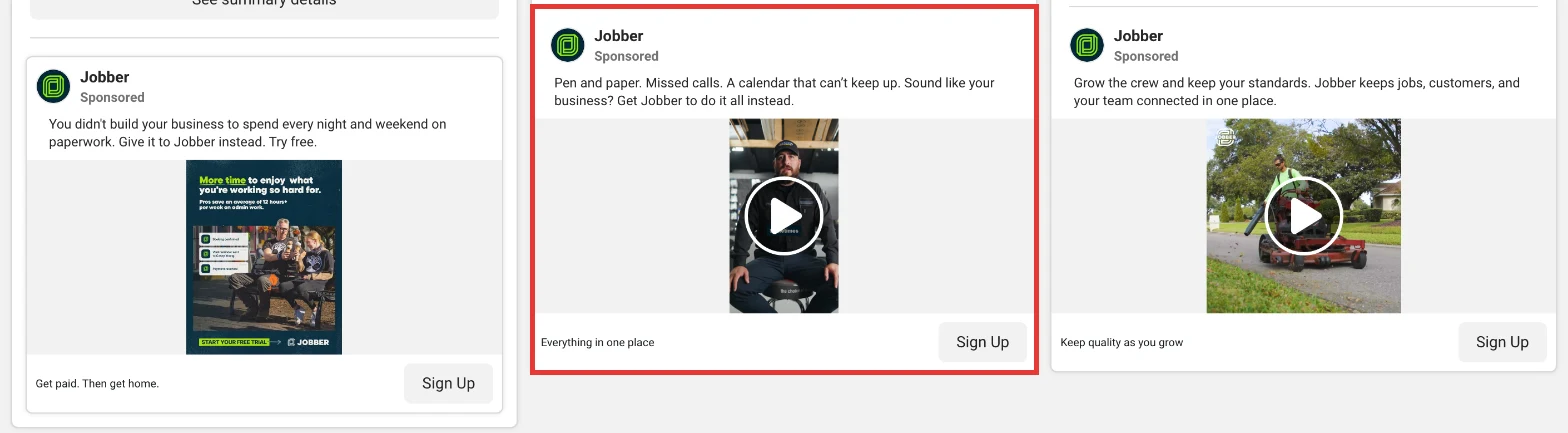
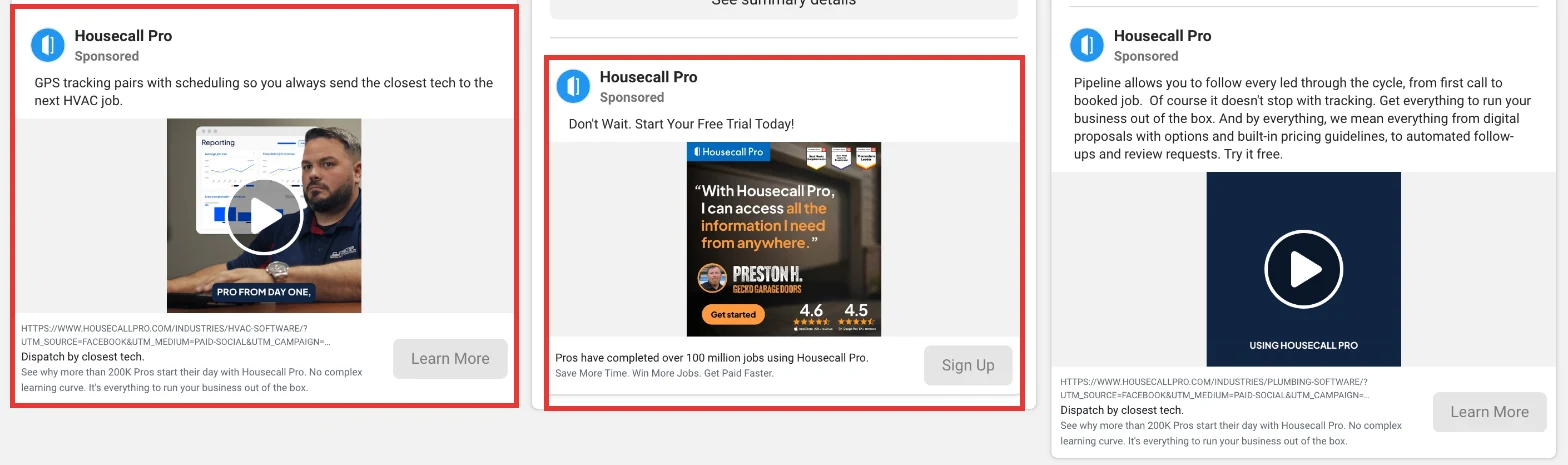
You can see what any company is running in Meta’s public Ad Library, and the field-service apps are a good place to look, because they sell to exactly the kind of owner we’ve been talking about.
Jobber’s boxed ad opens on “Pen and paper. Missed calls. A calendar that can’t keep up.” over a video of a real business owner talking to camera, so a plumber knows it’s about their week before the video even plays.
Housecall Pro does two things worth copying. The boxed ad on the left names one trade and one job, “send the closest tech to the next HVAC job”, and links to an HVAC page. The one in the middle is pure proof for retargeting, with a named customer’s quote, review scores and a free trial button.
Write the First Line for One Person
Write the first line so the person you want recognises themselves straight away. “Run your plumbing business from your phone” tells an owner it’s for them before they’ve finished reading. “Streamline your operations” could be for anyone, so nobody stops for it.
Here’s how the copy might change for the two people who buy it:
| Who | What they care about | First line |
|---|---|---|
| Owner | Getting paid faster and not losing jobs | “Still chasing invoices on a Friday night? Send them from the van.” |
| Office manager | A schedule that doesn’t fall apart by 10am | “Every tech’s schedule on one screen, updated as jobs move.” |
Test New Creative Every Week
Smaller B2B audiences see the same ads quickly, so creative wears out faster than you’d expect. I’d add two or three new ads a week and change one thing at a time, like the hook or the opening shot. Once an ad has had a fair amount of spend, turn it off if it’s still behind, and keep the winners running while you make new versions of them.
Step 6: Build a Full-Funnel Offer for Each Stage
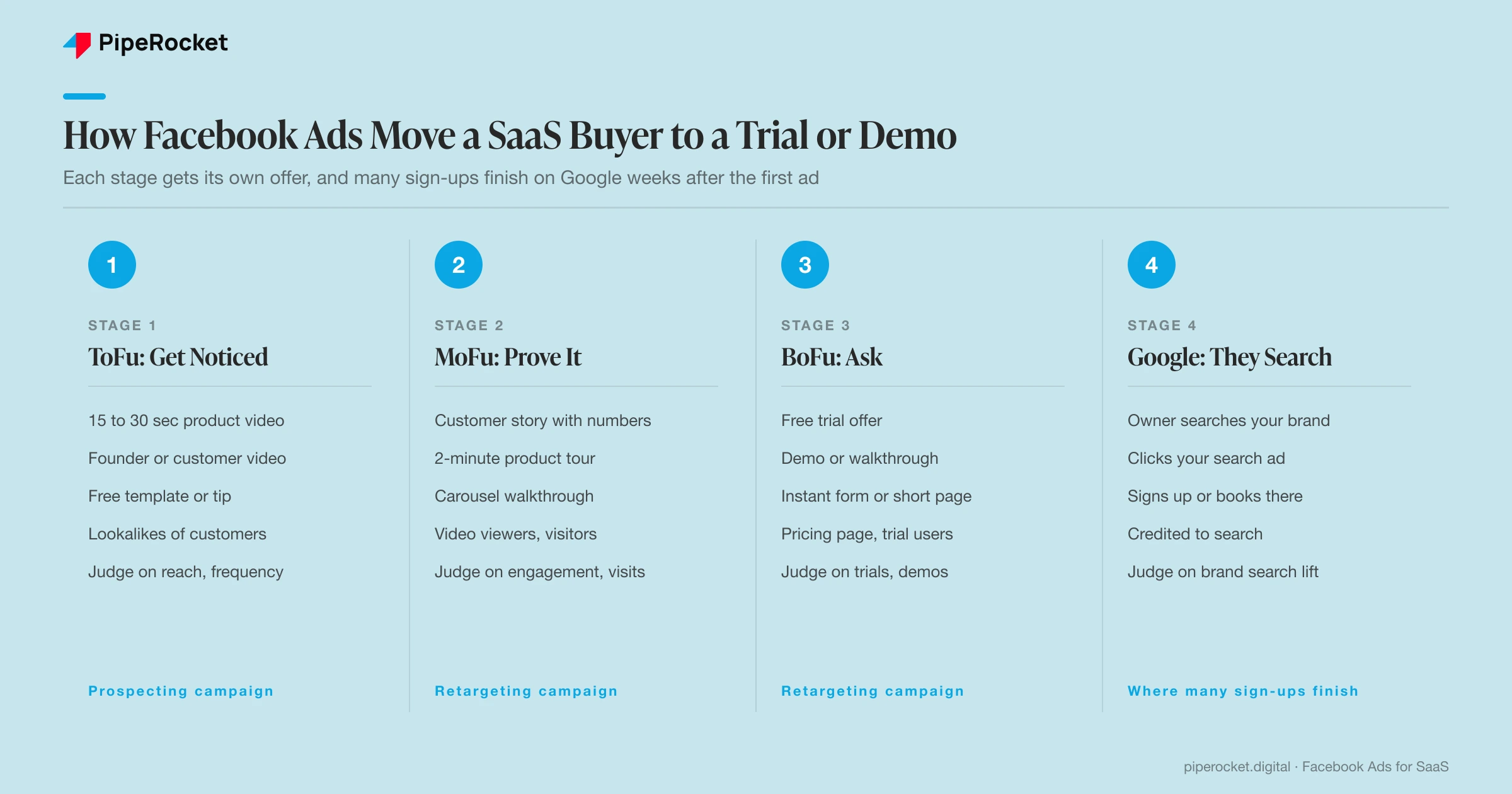
Someone who’s never heard of you won’t book a demo from one ad, so the offer has to match how warm they are:
| Stage | Who | What to offer | Example for the field-service app |
|---|---|---|---|
| ToFu | Cold prospecting audiences | Something useful with no sign-up | A 30-second video on getting paid on site, an educational carousel, or a free invoice template |
| MoFu | People who watched or visited | Proof and a closer look | A customer story with numbers, a 2-minute product tour, an ROI calculator or a webinar invite |
| BoFu | Pricing page visitors and trial users | The trial, an interactive sandbox or the demo | “Start free for 14 days”, “Try it with sample jobs” or “Book a 15-minute walkthrough” |
Wherever the ad sends people, the page has to pick up where the ad left off:
- Repeat the promise: If the ad says “send invoices from the van”, the headline says the same thing.
- Show the product: A screenshot or short clip of that exact workflow, on a phone if that’s how they’ll use it.
- Ask for one thing: The trial or the demo, with as few form fields as you can get away with.
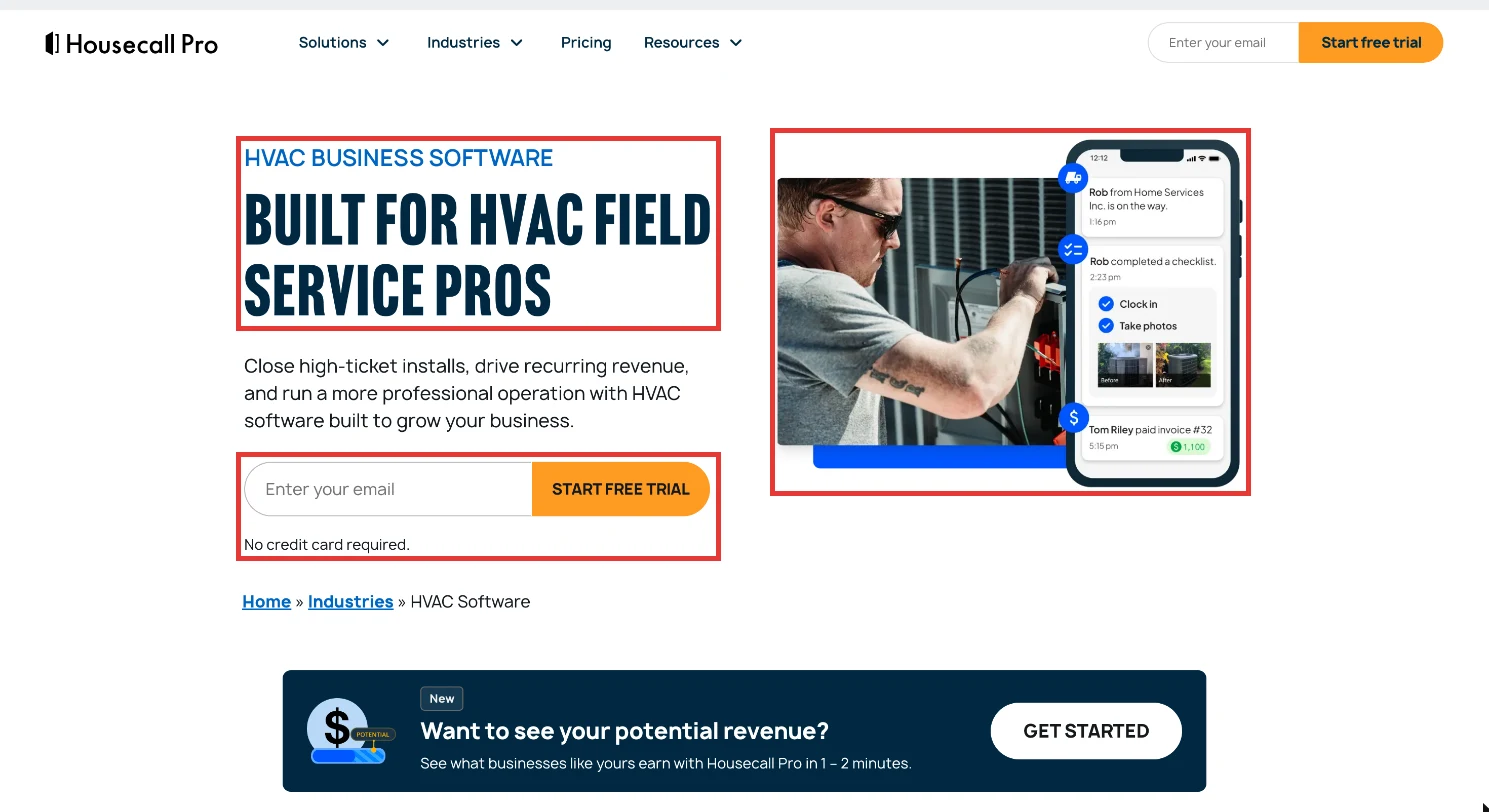
That HVAC ad from Housecall Pro lands on a page built for the same person. The headline says it’s for HVAC field service pros, the product is shown on a phone, and there’s one thing to do: enter your email and start the free trial.
Retarget by how recently people were with you, too, and bring over the ones who found you on Google:
| Who | What they should see |
|---|---|
| Visited your pricing page yesterday | The demo offer |
| Watched a product video five weeks ago | A customer story first |
| Came to your site from a Google search ad | Customer proof, like a case study or review |
For that last group, tag your search ads with UTM parameters and build a Meta audience from the visitors who came from them. Someone who searched “hvac scheduling software” last week is about as warm as a Meta audience gets.
Step 7: Set Your Budget From Reach and Cost Per Lead
Start with how many people you need to reach and how often, then check whether the cost per qualified lead makes sense:
Monthly budget = people you want to reach × times you want to reach them × CPM ÷ 1,000
Ads Manager shows an estimated reach and cost for each audience, so use your own numbers. Here’s how it might look for the field-service app, using example CPMs:
| Prospecting | Retargeting | |
|---|---|---|
| People to reach each month | 50,000 | 5,000 |
| Times each person sees an ad | 3 | 8 |
| Impressions needed | 150,000 | 40,000 |
| Example CPM | $15 | $25 |
| Monthly budget | $2,250 | $1,000 |
Check the cost per lead: If that $3,250 brings in 40 trial starts, each one costs about $81. Whether that works depends on how many trials turn into paying customers and what a customer is worth to you, and if the numbers don’t hold, change the audience or the offer before you add more budget.
Is $500 a month enough? It is for retargeting a small audience, but for prospecting it usually isn’t, because an ad set needs around 50 conversions in a week to finish learning, and at $30 to $80 a trial that’s well beyond $500.
Scale it slowly: Once it’s working, add new creative before you add new audiences, because fresh ads are usually what keeps results steady. Raise budgets in small steps every few days too, since a big jump counts as a significant edit and can send the ad set back into learning.
Step 8: Measure Lift and Pipeline
Facebook ads for SaaS will rarely get the last click, because the owner who saw your video three times this month usually books the demo after searching your name on Google, so the conversion shows up as organic or direct. That’s why I’d judge Meta on these:
| What to measure | Where to find it | What good looks like |
|---|---|---|
| Reach and frequency | Ads Manager | Your prospecting audience reached a few times a month |
| Brand searches | Search Console queries containing your name | Up after Meta goes live |
| Trials and demos from your industries | Your CRM, by company type | Up, from trades companies |
| How did you hear about us? | A field on your sign-up or demo form | Facebook and Instagram mentioned more often |
| Pipeline and revenue | Your CRM, with stages sent back through the Conversions API | Opportunities and customers from people who saw your ads |
Check lift by comparing the quarter before Meta with the quarter after. For the field-service app, it might look like this:
| Quarter before Meta | Quarter with Meta | |
|---|---|---|
| Brand searches a month | 300 | 420 |
| Trial starts from trades companies | 60 | 85 |
| Sign-ups that said “Facebook” or “Instagram” | 2 | 14 |
| Trials Meta claimed in Ads Manager | 0 | 22 |
Meta only claims 22 trials, but look at what changed across the business:
- More trials from your market: 25 more from trades companies.
- More people searching your name: 120 more a month.
- More people naming Meta: 12 more sign-ups said they found you on Facebook or Instagram.
That’s also how I’d report it to a CFO, in three lines:
- What you spent: Meta spend for the quarter.
- What came back: The extra pipeline from the companies you were targeting.
- What it cost: The cost per trial or demo, next to what a customer is worth.
Give it at least a full quarter, because the first signals show up in a few weeks but pipeline takes longer.
How Much Do Facebook Ads Cost for SaaS?
Facebook ads for SaaS cost whatever it takes to reach your audience often enough, so the budget comes from your audience size, how often you want to reach them and your CPM, then gets checked against your cost per qualified lead.
Meta doesn’t publish average costs, so use the estimates in Ads Manager for your own audience. For a sense of scale, this is what Dreamdata’s 2026 benchmarks found across its B2B customers:
| Meta | Google Search | ||
|---|---|---|---|
| Average cost per click | €1.60 | €5.98 | Not reported |
| Return on ad spend over the full customer journey | 51% | 121% | 67% |
So Meta’s clicks are much cheaper, and it’s worth checking them against the pipeline they actually bring in.
If you’re hiring someone to run Facebook ads for SaaS, these are the averages we see:
| Model | What you get | What you pay for | Typical cost |
|---|---|---|---|
| In-house | A paid media manager and a specialist | Two salaries | $4,500 to $6,500 a month |
| Agency | An account manager, a specialist and an analyst | One monthly retainer | $4,000 to $5,000 a month |
| Hybrid | Your team working with an agency | Salaries plus a retainer | Around $10,000 a month |
How PipeRocket Runs Facebook Ads for SaaS
We run Facebook and Meta ads for SaaS companies as one part of a paid program, starting with the tracking and the conversion event so Meta learns from the leads that turn into pipeline. Then we build audiences from your own customers and visitors, keep the account lean, ship new creative every week, and report on lift and pipeline alongside what Ads Manager claims.
If you’re already spending on Meta and can’t tell whether it’s working, we’ll audit your Meta ads account and show you what to fix first.
Frequently Asked Questions
How do you run Facebook ads for SaaS?
To run Facebook ads for SaaS, set up the Pixel and Conversions API, build audiences from your customers and visitors, keep to a prospecting and a retargeting campaign, optimize for trials or demos, use product videos and proof, match offers to each stage and measure lift and pipeline.
Do Facebook ads work for B2B SaaS?
Facebook ads work for B2B SaaS when your buyers use Facebook and Instagram, like small-business owners, and when you build audiences from your own customer data. For enterprise products sold to a narrow buying committee, Meta works best as retargeting, with LinkedIn reaching the named roles first.
How much should a SaaS company spend on Facebook ads?
A SaaS company should spend what it takes to reach its audience a few times a month: audience × frequency × CPM ÷ 1,000. $500 a month is enough to retarget a small audience, but prospecting usually needs more, because an ad set needs around 50 conversions a week to finish learning.
What’s the best Facebook ad format for SaaS?
The best Facebook ad format for SaaS is usually a 15 to 30 second product demo video that shows the workflow on screen. Founder-led and customer videos build trust, carousels walk through features, and static ads with a real customer result work well for retargeting.
What if my audience is too small for a lookalike?
If your audience is too small for a lookalike, seed it from a bigger group that still shows intent, like everyone who started a trial or visited your pricing page. Add phone numbers and personal emails to your uploads, because work emails often match badly on Meta.
Should I optimize Meta ads for trials or demos?
Optimize Meta ads for trials if you’re product-led and demos if you’re sales-led. If you have both, optimize prospecting for trial starts and retargeting for demos, and move to activated trials or SQLs once you have enough volume for Meta to learn from.
Are Meta ads or LinkedIn ads better for B2B SaaS?
Meta ads are better for B2B SaaS that sells to small businesses and prosumers, and for cheap retargeting. LinkedIn ads are better for reaching named roles at named companies. Most SaaS companies are better off running Google first, then adding whichever of the two matches where their buyers spend time.
How do I report Meta ads for B2B SaaS to my CFO?
Report Meta ads for B2B SaaS to your CFO on spend, the extra pipeline from the companies you targeted, and the cost per trial or demo next to customer value. Compare a quarter with Meta against a quarter without it, because Ads Manager alone undercounts what Meta started.