LinkedIn Ads for SaaS: How to Run Them in 8 Steps
 Praveen Ravi
Last updated on
LinkedIn Ads for SaaS is paid advertising on LinkedIn aimed at the decision-makers who buy software, used to build awareness with the right companies before they’re in the market and judged on the pipeline it influences.
LinkedIn charges you every time your ad is shown, whether or not anyone clicks, so the money is won or lost on who sees it. If your ad reaches the right 20,000 people a few times a month, it works, but if it reaches two million people once each, hardly any of them will remember your name. I’ve written this for SaaS founders, demand gen leads and paid media managers who are about to try LinkedIn, or who are already spending on it and can’t tell whether it’s working.
The 8-Step LinkedIn Ads Playbook for SaaS at a Glance
- Set up tracking before you launch: Install the Insight Tag and Conversions API, upload your target account and customer lists, and have at least five creatives ready.
- Build your audience from your ICP: Layer job function, seniority, company size and industry, exclude customers, and keep the audience small enough to reach properly.
- Pick the objective and bidding: Start with manual bidding, switch off Audience Network and Audience Expansion, and avoid Max Delivery while you learn what clicks cost.
- Match ad formats to the funnel: Use thought leader, document and video ads for awareness, proof ads for retargeting, and lead gen forms or conversation ads to convert.
- Set your budget from audience size: Work out what it costs to reach your audience a few times a month, instead of picking a number and spreading it thin.
- Launch in order and retarget: Start with awareness, retarget the people who engage with case studies, and only then ask the warmest for a demo or trial.
- Optimize every week: Watch frequency, click-through rate and audience penetration, and refresh creative before your audience gets tired of it.
- Measure lift and pipeline: Track reach on target accounts, brand searches, direct visits and pipeline in your CRM, and pass engaged companies to sales.
What Is LinkedIn Ads for SaaS?
LinkedIn Ads are a primary channel for B2B SaaS companies to reach decision-makers by job function, seniority, company size, industry and named account, so the right buyers know your product before they start looking for one.
When people talk about LinkedIn ads for SaaS, they sometimes mean the “Boost” button on a company page post. Boosting puts a bit of money behind one post, and it’s fine for a quick test, but you can’t build retargeting audiences, run lead gen forms or control bidding properly from there. Everything in this guide happens in Campaign Manager, LinkedIn’s ad platform, where you set up campaign groups, audiences, objectives and budgets yourself.
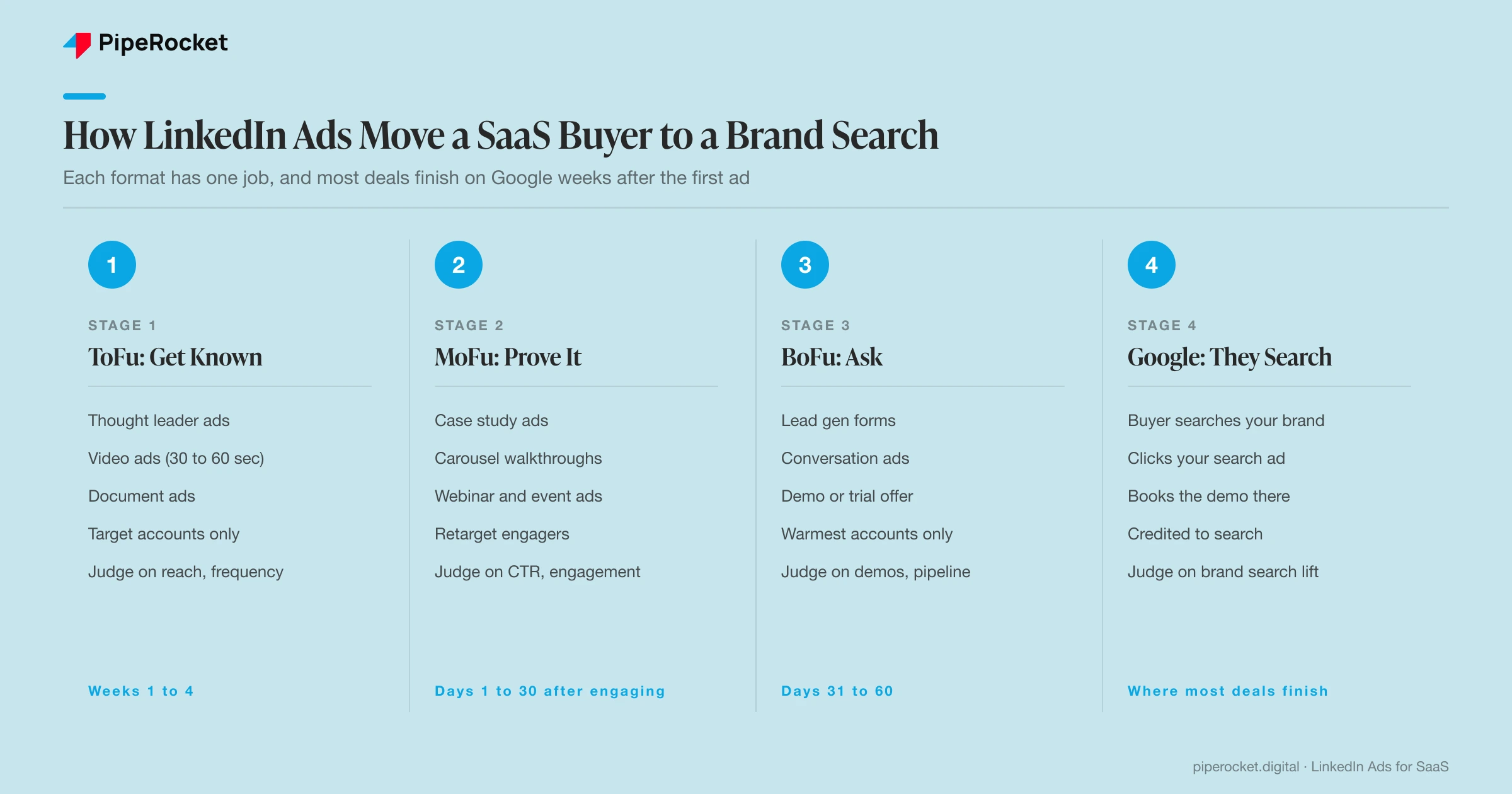
The other question I get early on is whether LinkedIn replaces Google Ads, and the short answer is no, because the way I’d put it, Google is for capture and LinkedIn is for influence. Someone searching “contract management software” on Google already has the problem, and your search ad catches them right then. Nobody on LinkedIn is shopping for software, but the general counsel who sees your ad four times this month is the one who searches your name when the renewal comes up.
When Are LinkedIn Ads Worth It for SaaS?
LinkedIn ads for SaaS are worth it when your contract value is high enough to pay for expensive reach, your buyers are a group of people at a company and your sales cycle runs for weeks or months.
Most companies running LinkedIn ads for B2B SaaS tick those boxes, but not every one does, so here’s how I’d think about it by the kind of company you are:
| Your company | Is LinkedIn worth it? | Why |
|---|---|---|
| Sales-led, high ACV (roughly $25,000+ a year), selling to a buying committee | Yes, and usually early | Every deal involves several people you can name by title and company, and one deal pays for months of reach |
| Mid-market, ACV in the low five figures | Yes, with a tight audience | It works when you target a few thousand companies properly, and gets expensive fast when you go broad |
| Product-led, low ACV, sold to individuals | Usually no, at least not first | Clicks cost too much for a $20 a month tool, so search, SEO and Meta will do more for the money |
| Pre product-market fit, ICP still changing | Not yet | You can’t build a LinkedIn audience until you know which titles and companies actually buy |
If you sell a $20 a month tool to freelancers, LinkedIn will eat the budget before anything comes back. But if one customer is worth $40,000 a year, being in front of the six people who’ll decide on it for a quarter is cheap.
How to Run LinkedIn Ads for SaaS in 8 Steps
To run LinkedIn ads for SaaS, set up tracking, build your audience from your ICP, pick the objective and bidding, match formats to the funnel, set your budget from audience size, launch in order, optimize weekly and measure lift and pipeline.
That’s the whole LinkedIn ads strategy in one line, and to make each step concrete, I’ll follow one example: a SaaS company selling contract management software to mid-market companies. Legal operations is usually who finds the product, the general counsel owns the budget and finance signs off.
| Step | What you do | Where you do it |
|---|---|---|
| 1. Set up tracking | Install the Insight Tag and Conversions API, upload lists, prepare creatives | Campaign Manager, your CRM |
| 2. Build your audience | Layer function, seniority, company size and industry, and exclude customers | Campaign Manager audiences |
| 3. Pick objective and bidding | Choose the objective per campaign and switch off the settings that waste money | Campaign Manager campaign settings |
| 4. Match formats to the funnel | Pick thought leader, document, video, lead gen or conversation ads by stage | Campaign Manager ads |
| 5. Set your budget | Work out impressions needed from audience size and frequency | A spreadsheet and the forecast panel |
| 6. Launch in order and retarget | Go live with awareness first, then retarget by window | Campaign Manager, Matched Audiences |
| 7. Optimize weekly | Watch frequency, CTR and penetration, and refresh creative | Campaign Manager reporting |
| 8. Measure lift and pipeline | Track brand searches, direct visits and pipeline from target accounts | Search Console, GA4, your CRM |
Step 1: Set Up Tracking Before You Launch
It’s tempting to launch first and sort out tracking later, but then three weeks in, someone asks whether it’s working and there’s no way to find out. So before a single ad goes live, get these in place:
| What to have ready | Why you need it |
|---|---|
| The LinkedIn Insight Tag on every page of your site | It builds your website retargeting audiences and records conversions |
| The Conversions API connected to your CRM | It sends demos, opportunities and closed deals back to LinkedIn, even when cookies don’t |
| Your target account list and your customer list uploaded | One to target, one to exclude |
| At least five creatives per campaign | LinkedIn suppresses an ad fast once the same people have seen it a couple of times |
| One proof asset, like a case study with real numbers | It’s what you’ll show people once they’ve engaged |
| One or two people willing to be the face of thought leader ads | Usually your founder or a senior person your buyers would know |
| Someone who owns lead follow-up | Leads from LinkedIn forms go cold quickly if nobody calls |
The account list takes the longest, so start there. For our contract management company, it might be 3,000 US companies with 200 to 2,000 employees in financial services, healthcare and technology, which is the list sales already works from.
Step 2: Build Your Audience From Your ICP
Since you’re paying for every impression, every person in the audience who can’t buy from you costs you money each time your ad shows up in their feed, so the audience matters more than anything else you’ll set up.
Layer the Targeting
I’d build the audience in layers, starting with the companies and then narrowing down to the people inside them:
| Filter | What it does | Example for contract management software |
|---|---|---|
| Company list or company size | Limits ads to companies that can afford you | Your uploaded list of 3,000 accounts, or 200 to 2,000 employees |
| Industry | Keeps you in the markets you sell to | Financial services, hospitals and health care, software development |
| Job function | Finds the department that owns the problem | Legal, Finance, Operations |
| Seniority | Takes out junior people who can’t buy | Manager, Director, VP, CXO |
| Job title (optional) | Adds titles that functions miss | Legal operations manager, general counsel, contracts manager |
| Skills (optional) | Catches people who do the work under an unusual title | Contract management, legal operations, contract negotiation |
| Exclusions | Stops you paying to reach people who already pay you | Your customer list, your own employees, competitors |
Start from the problem your product solves and work out who owns it, because the obvious title is often the wrong one. We had a client whose product repurposes content, and the natural instinct was to target demand gen and growth marketers. The people who actually cared were Heads of Content, Content Directors and content marketing managers, so we ended up putting around 80% of the audience on content titles and 20% on broader marketing. Going after “marketing” in general would have spent most of the budget on people who’d never use it.
If you’re running ads around an event, there’s also a location option most people miss. LinkedIn lets you target people who were recently in a place, as well as people who live there. For a client with a conference booth in San Francisco, most attendees were flying in from elsewhere, so we targeted people recently in the area during the event week instead of San Francisco residents, and the booth got noticeably busier.
Keep the Audience the Right Size
LinkedIn needs at least 300 members to run an ad set, and suggests 50,000 or more to drive results. For SaaS, I’d worry less about hitting a big number and more about whether your budget can reach the audience you’ve built. A budget that reaches 2% of the audience once a month does nothing, because nobody remembers an ad they saw once.
If your target list is small, say a few hundred accounts, LinkedIn will usually match only part of it, and some campaigns won’t have enough people to deliver. You can widen it by adding more job functions inside the same companies instead of loosening the company filters.
If you’re tiering accounts for ABM, with tailored ads for a handful of must-win companies and broader ones for the rest of the list, our guide on LinkedIn account-based marketing covers how to set up each tier.
Real Client Story
Here’s what an audience that’s too big does to a budget. A SaaS client came to us running what I’d call spray and pray: a modest monthly budget aimed at an audience of close to two million people, on broad targeting with Max Delivery bidding. In August, their ads reached about 33,000 people, which sounds fine until you see it was only 1.70% of the audience. Most of the impressions went to junior people who were never going to buy.
We split the campaigns by region and product, added strict ICP filters for seniority, industry and company size, and moved to manual bidding. By November, audience penetration was 19.20%, so the ads were reaching nearly one in five of the people they were meant to, about five or six times each over the month.
This is their Campaign Manager data month by month. Look at the last two columns I’ve boxed: penetration sat at 1.70% for two months, dipped to 0.60% in October, and jumped to 19.20% in November.

The cost per click went up, from ₹209 in September to ₹578 in November, and I’d expect that every time. A narrower audience of senior people costs more to reach than a broad one full of juniors. What changed is that the money was now reaching the people who could buy, often enough for them to remember the name.
Step 3: Pick the Objective and Bidding
Every campaign in Campaign Manager starts with an objective, and the one you pick decides which formats and bidding options you get. You can’t change it later without rebuilding the campaign, so choose it by what the campaign is there to do:
| Objective | When to use it | What you’re paying for |
|---|---|---|
| Brand awareness | Reaching your target accounts regularly with thought leader, video and document ads | Impressions |
| Engagement | Building an audience of people who’ve interacted with your posts, to retarget later | Impressions or clicks |
| Video views | Building a video viewer audience to retarget | Views |
| Website visits | Sending warm people to a case study, pricing page or report | Clicks |
| Lead generation | Collecting leads with LinkedIn’s pre-filled forms, usually from retargeted audiences | Clicks or leads |
| Website conversions | Driving demo or trial sign-ups on your own site | Clicks or conversions |
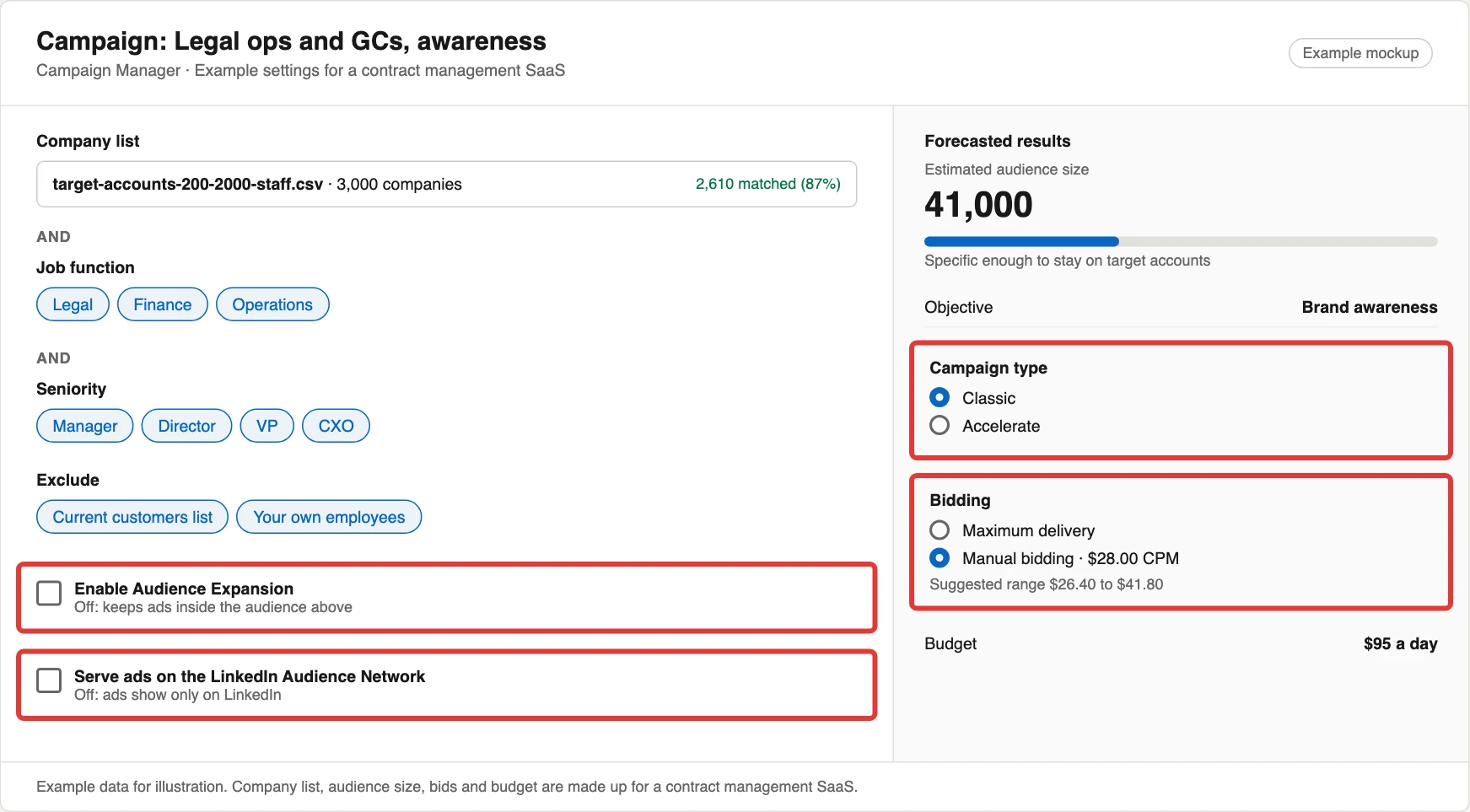
Then come the settings, and four of the defaults are worth changing before you launch:
- Audience Network: Switch it off, because it shows your ads on third-party apps and sites outside LinkedIn, where you can’t see who you’re reaching, and you’re paying LinkedIn’s prices for it.
- Audience Expansion: Switch it off, because it adds people LinkedIn thinks are similar to your audience and undoes the targeting you’ve just built.
- Campaign type: Use Classic campaigns while you’re learning. Accelerate campaigns let LinkedIn’s AI choose the audience and creative, and you lose most of the control you need early on.
- Bidding: Start on manual bidding at the low end of the suggested range, and raise it only if the campaign doesn’t spend. Max Delivery tells LinkedIn to spend the whole budget as fast as it can, and early on you want to see what a click actually costs first. That’s why a lot of SaaS growth teams start with website visits (traffic) campaigns on manual bidding, which usually keeps the cost per click down while you learn.
Here’s what those four settings look like on a campaign for our contract management company, with each one boxed:
Step 4: Match Ad Formats to the Funnel
SaaS LinkedIn ads work best when each format has one job. A cold general counsel and a legal ops manager who’s read your case study twice need very different things from you.
Which Format for Which Stage
| Stage | Format | What it’s good for |
|---|---|---|
| ToFu | Thought leader ads | Putting your founder’s or an expert’s real post in front of the target audience |
| ToFu | Video ads | Showing the product or a customer in 30 to 60 seconds, and building a viewer audience |
| ToFu | Document ads | Letting people read a report or checklist in the feed |
| MoFu | Single image and carousel ads | Case studies, a customer result, a feature walkthrough card by card |
| MoFu | Event ads | Webinars and events for people who already know you |
| BoFu | Lead gen forms | A demo or trial request on pre-filled forms, for warm audiences |
| BoFu | Conversation ads | A direct offer in the inbox, for people who’ve engaged several times |
Thought leader ads are the format I’d start almost every SaaS account with. In ZenABM’s 2026 benchmarks across 211 B2B companies, the typical thought leader ad got a 2.68% click-through rate, against 0.42% for a typical single image ad. People trust a person in their feed more than a company page, so pick someone your buyers would actually want to hear from, usually your founder or a senior expert, and have them post things they’d say anyway: what they’re seeing in customer conversations, an opinion on how the work is changing, a lesson from a hard quarter. Then you put paid reach behind the posts that do well.
Real SaaS Ads That Work
You can see what any company is running in LinkedIn’s public Ad Library, and it’s worth ten minutes before you write your own. Here are three SaaS examples, one for each job.
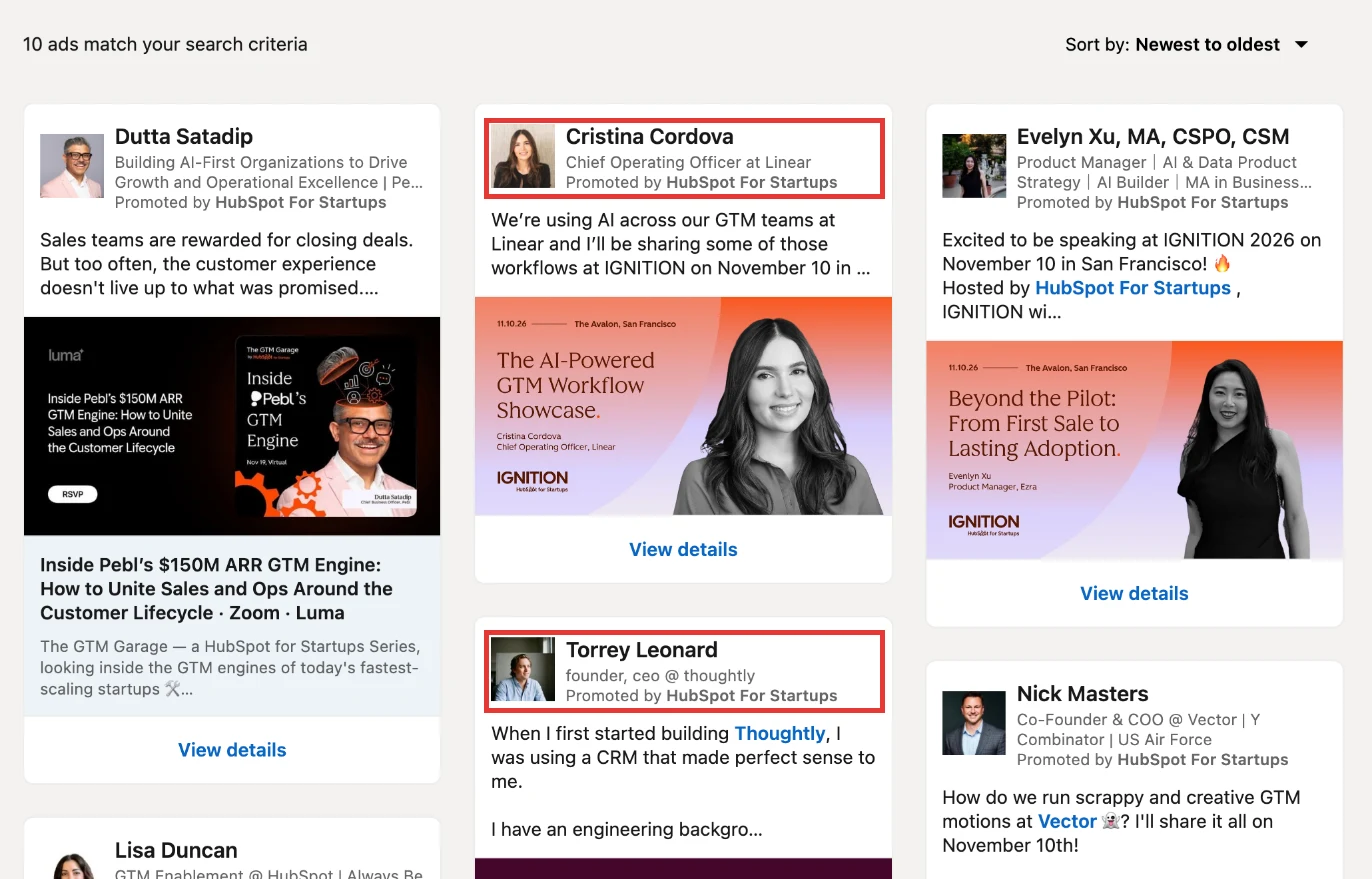
HubSpot runs thought leader ads from the founders and operators speaking at its startup event. The boxed lines show the person’s name and title first, with “Promoted by HubSpot For Startups” underneath, so the ad reads like Linear’s COO talking about the work at Linear.
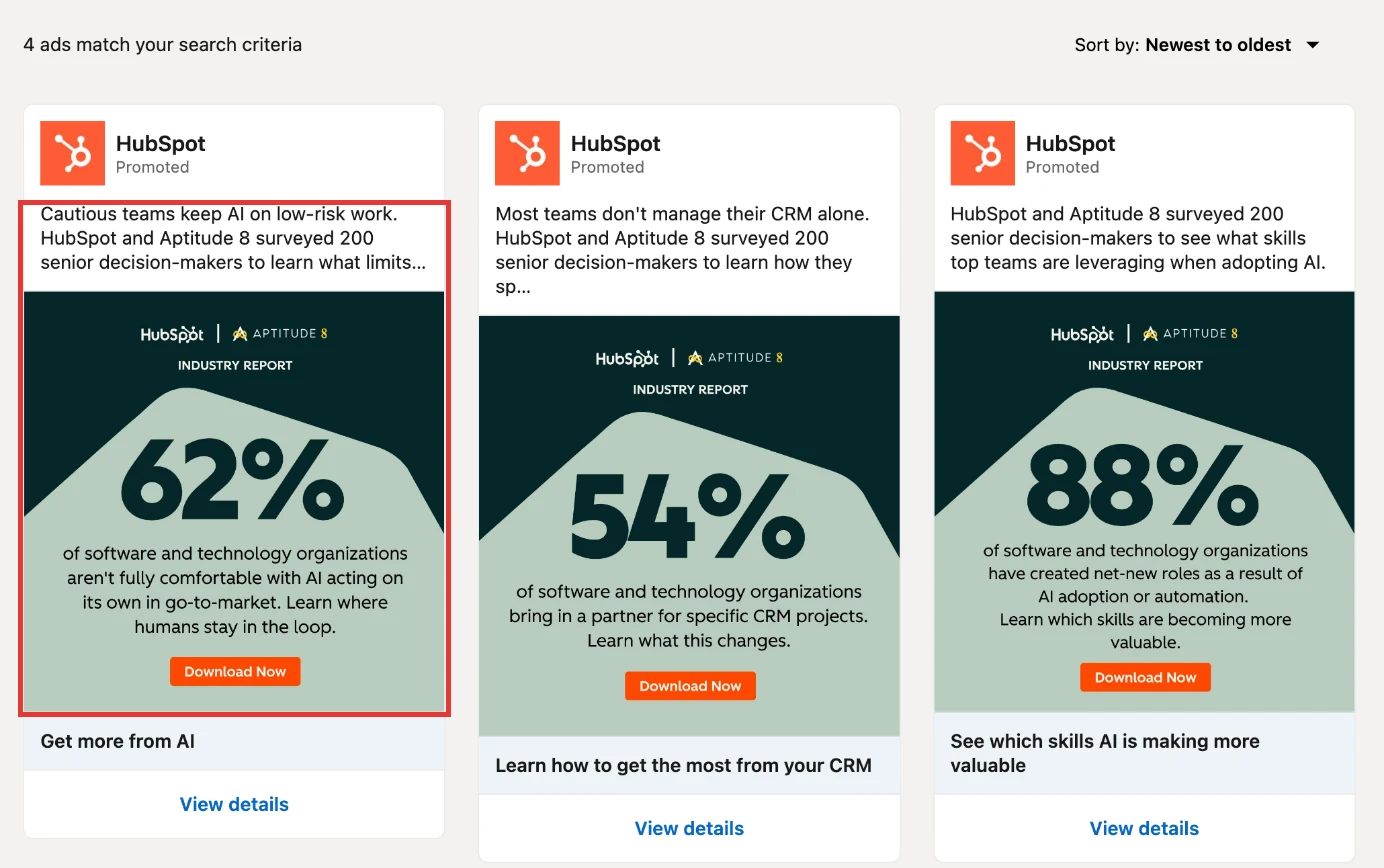
For ToFu reach, HubSpot also runs a survey report as a series of ads, each one built around a single number. The boxed ad leads with 62% of software and technology companies not being fully comfortable with AI acting on its own in go-to-market, and offers the full report as a download.
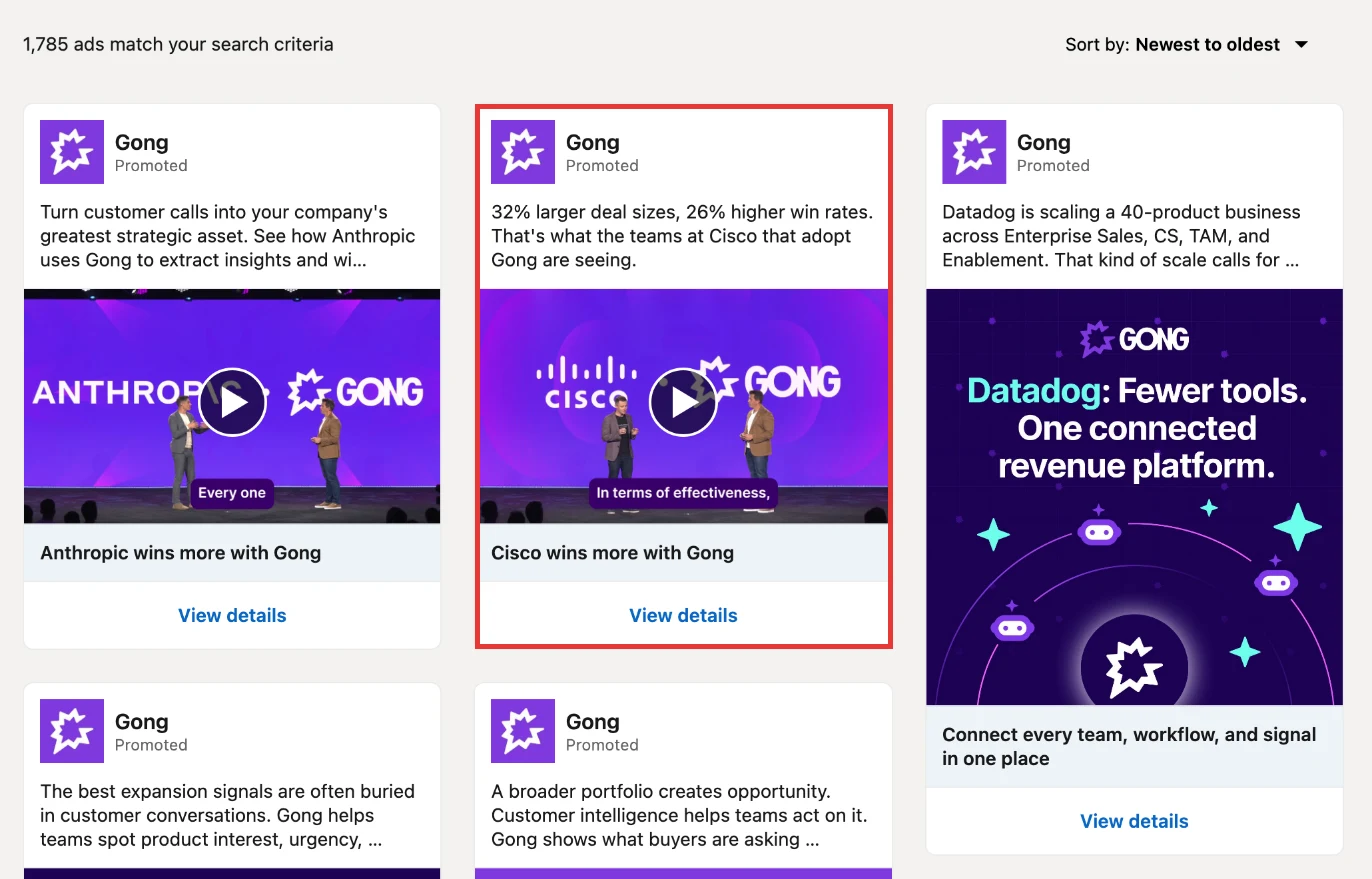
And for MoFu proof, Gong runs customer videos with the result in the very first line. The boxed one opens with “32% larger deal sizes, 26% higher win rates” from Cisco’s teams, which is exactly what you’d want someone to read after they’ve engaged with you once.
What to Say to a Champion vs an Executive
Each person on the buying committee for SaaS needs a different message, so the champion and the person who signs hear different things even inside the same campaign. Either way, write your LinkedIn ad copy the way your buyer talks, naming one problem they’d recognise instead of reading like a press release. Here’s how that might look for our contract management company:
| Stage | To the champion (legal ops manager) | To the executive (general counsel or CFO) |
|---|---|---|
| ToFu | “How our legal ops team stopped chasing signatures over email” (founder’s post) | “What a contract backlog costs a 500-person company in a year” (document ad) |
| MoFu | “See how [customer] cut contract turnaround from 9 days to 3” (case study) | “How [customer]’s GC got renewal dates in front of finance 90 days early” (case study) |
| BoFu | “Book a 20-minute demo with your own contracts” (lead gen form) | “Get a security and procurement pack for your review” (conversation ad) |
Basically, the champion is the end user who deals with the problem every day, so they want to hear that their week gets easier, and the executive wants to hear about ROI: lower risk and cost, a more efficient team and no painful switch.
Step 5: Set Your Budget From Audience Size
The budget should come from how many people you need to reach and how often, rather than a number someone picked. The maths is simple:
Monthly budget = people you want to reach × times you want to reach them × CPM ÷ 1,000
CPM is what LinkedIn charges for 1,000 impressions, and the forecast panel in Campaign Manager shows you an estimate for your exact audience. Here’s how it works out for two list sizes, using an example CPM of $50, close to the typical figure in the cost benchmarks further down:
| Smaller target list | Larger target list | |
|---|---|---|
| Audience size | 15,000 people | 60,000 people |
| Share you want to reach each month | 50% (7,500 people) | 40% (24,000 people) |
| Times each person sees an ad | 4 | 4 |
| Impressions needed | 30,000 | 96,000 |
| Monthly budget at a $50 CPM | $1,500 | $4,800 |
If the budget you have is smaller than what the maths says, shrink the audience until it fits, starting with your best-fit accounts. Spreading the same budget across the bigger audience is how you end up at 2% penetration. And keep in mind that smaller, more senior audiences usually come with a higher CPM, so check the forecast for each audience you build. LinkedIn’s own floor is $10 a day, so a campaign can’t run on less than about $300 a month.
Step 6: Launch in Order and Retarget
Most of the pipeline from LinkedIn comes from people who’ve seen you a few times, so the order campaigns go live matters.
The Order Campaigns Go Live
I’d launch awareness first and let it run for two to four weeks before anything asks for a demo. Thought leader, video and document ads build the audiences you’ll retarget: people who watched half a video, opened a document or visited your site. Once those audiences have a few hundred people in them, the retargeting campaigns can start.
Retargeting by Window
Here’s how a two-month LinkedIn retargeting sequence might look for someone from a target account who watched your founder’s video:
| Window | What they see | Format |
|---|---|---|
| Days 1 to 14 | Social proof: a case study from a company like theirs, with real numbers | Single image or carousel |
| Days 15 to 30 | A short product walkthrough, or answers to the objections sales hears most, like security, migration and price | Video, document or event ad |
| Days 31 to 60 | A demo offer, or a pricing and procurement pack | Lead gen form or conversation ad |
If someone engages with the case study, they move forward. If they’ve done nothing after 60 days, they drop back into the awareness audience instead of seeing a demo offer for the fifth time.
Lead Gen Form or Landing Page?
| Use a LinkedIn lead gen form when | Use your landing page when |
|---|---|
| The offer is simple, like a report, a demo request or a webinar | The buyer needs to see pricing, integrations or security details first |
| You want more leads and you’re fine qualifying them afterwards | You’d rather have fewer leads who’ve read more |
| Most of your audience is on mobile | You need your own tracking and testing on the page |
Lead gen forms fill in the person’s name, email, company and title from their profile, which is why they collect more leads, but it also means some people submit without thinking much about it, so sync the form to your CRM and have someone follow up the same day.
Bring Search Visitors Over
The other audience worth building is people who came to your site from your Google search ads. Tag your search ads with UTM parameters, build a LinkedIn audience from visitors to those pages, and show them case studies and customer proof. We often pair it with LinkedIn engagers, like people who watched half a video, to build a sequence that moves both groups toward a demo. Someone who searched “contract management software” last week is about as warm as a LinkedIn audience gets.
Step 7: Optimize Every Week
Once a week, I’d open Campaign Manager and look at four numbers, because each one tells you something different:
| What you see | What it usually means | What to do |
|---|---|---|
| Frequency above 6 to 8 a month, and CTR falling | The same people are tired of the same ads | Add new creatives, or widen the audience slightly |
| Audience penetration under 10% | The budget can’t reach the audience you built | Narrow the audience or raise the budget |
| CTR low from day one | The message or the targeting is off | Test a different hook, or check who’s actually seeing the ads in demographics reporting |
| CPM climbing week on week | You’re competing for a small, popular audience | Add more job functions inside the same accounts, or test thought leader ads |
| Leads coming in, but sales rejects them | The offer is too easy, or the audience is too junior | Tighten seniority and ask a qualifying question on the form |
Those weekly numbers are also the quickest way to test positioning, because you can see which message wins with which job title, and that’s worth passing on to your website and sales team. I’d plan on refreshing creative every four to six weeks on smaller audiences, and sooner if frequency climbs fast. The demographics report is worth a look every week too: it shows the job titles, companies and seniority your ads actually reached, which is where you’ll spot a campaign drifting toward the wrong people. If something still isn’t working after that, it’s usually one of the common SaaS LinkedIn ads mistakes, like running a single creative or sending clicks to a page that doesn’t match the ad.
Step 8: Measure Lift and Pipeline
LinkedIn ads for SaaS will rarely get the credit in your attribution reports. The general counsel who saw your ads for two months usually searches your company name on Google when they’re ready, and the demo shows up as organic or direct. So I’d judge LinkedIn on these:
| What to measure | Where to find it | What good looks like |
|---|---|---|
| Reach and frequency on target accounts | Campaign Manager, company engagement report | Most of your target accounts reached, a few times a month |
| Audience penetration | Campaign Manager reporting | Rising, and above 10% on your main audience |
| Brand searches | Search Console queries containing your name | Up after LinkedIn goes live |
| Direct visits from target accounts | GA4, or a tool that identifies company visits | Up |
| How did you hear about us? | A field on your demo form | LinkedIn mentioned more often |
| Pipeline from target accounts | Your CRM, with LinkedIn engagement synced through the Conversions API | Opportunities from accounts that engaged with your ads |
Check lift by comparing the quarter before LinkedIn with the quarter after. For our contract management company, it might look like this:
| Quarter before LinkedIn | Quarter with LinkedIn | |
|---|---|---|
| Brand searches a month (Search Console) | 400 | 560 |
| Demo requests from target accounts | 18 | 27 |
| Demos where “LinkedIn” was the answer to how they heard about you | 0 | 9 |
| Leads LinkedIn claimed in Campaign Manager | 0 | 4 |
Campaign Manager only claims four leads, but the real picture is nine more demos from the accounts you were targeting, plus 160 more people a month searching your name. Give it at least a full quarter before you decide, because a SaaS buyer who first sees you in month one might not book a demo until month three.
Last, hand the engagement to sales. LinkedIn’s company engagement report shows which target accounts are seeing and interacting with your ads, and those are the companies your outbound reps should be following up with this month, while your name is still fresh.
How Do LinkedIn Ads and Google Ads Work Together?
LinkedIn Ads and Google Ads work together because LinkedIn builds familiarity with the accounts you want, and Google catches those same buyers when they search for a solution or your brand.
In the SaaS PPC programs we run, the two feed each other in three ways. LinkedIn makes your name familiar, so when the general counsel searches “contract management software” and sees your search ad, they already know who you are and are more likely to click it. Brand searches go up, and those are the cheapest clicks in your search account. And people who arrive from your Google ads can be retargeted on LinkedIn with case studies until they’re ready to talk.
That’s why, if you’re starting from nothing, I’d get Google Ads for SaaS capturing the demand that already exists first, and then add LinkedIn to build more of it.
How Much Do LinkedIn Ads Cost?
LinkedIn ads cost whatever it takes to reach your audience often enough, so the budget comes from your audience size, frequency and CPM, with a platform minimum of $10 a day.
For reference, here’s what the benchmarks say for B2B and SaaS accounts, though your own forecast in Campaign Manager will be more accurate for your audience:
| Cost | Benchmark | Source |
|---|---|---|
| Average LinkedIn CPC | €5.98 | Dreamdata, 2026 report on 2025 data |
| Typical CPM, single image ads | $59.15 | ZenABM, 211 B2B companies, 2026 |
| Typical CPM, thought leader ads | $49.37 | ZenABM, 211 B2B companies, 2026 |
| Click-through rate, thought leader ads | 2.68% | ZenABM, 211 B2B companies, 2026 |
| Click-through rate, single image ads | 0.42% | ZenABM, 211 B2B companies, 2026 |
| Minimum daily budget | $10 |
Senior audiences in competitive industries cost more than these averages, and the narrower your audience, the higher your CPM is likely to be. The clicks are pricier than search, but Dreamdata also tracked the full customer journey in its 2026 LinkedIn Ads benchmarks, and LinkedIn returned 121% ROAS against 67% for Google Search, mostly because it starts deals that close later through other channels. If you’re hiring someone to run LinkedIn ads for SaaS, here’s what management usually costs:
| Model | What you get | What you pay for | Typical cost |
|---|---|---|---|
| In-house | A paid media manager and a specialist | Two salaries | $4,500 to $6,500 a month |
| Agency | An account manager, a specialist and an analyst | One monthly retainer | $4,000 to $5,000 a month |
| Hybrid | Your team working with an agency | Salaries plus a retainer | Around $10,000 a month |
LinkedIn Ads Terms to Know
Campaign Manager has its own vocabulary, so these are the terms you’ll run into once you start running LinkedIn ads for SaaS:
| Term | What it means |
|---|---|
| Campaign Manager | LinkedIn’s platform for creating and managing ads |
| Objective | The goal you choose for a campaign, which decides the formats and bidding you can use |
| CPM | Cost per 1,000 impressions |
| Frequency | How many times, on average, each person saw your ads |
| Audience penetration | The share of your target audience your ads reached |
| Matched Audiences | Audiences built from your own data: website visitors, uploaded account or contact lists, and people who engaged with your ads |
| Insight Tag | The LinkedIn code on your site that tracks visits and conversions |
| Conversions API | A server-side connection that sends conversions from your CRM or site back to LinkedIn |
| Thought leader ads | Ads that promote a person’s post instead of a company page post |
| Audience Network | LinkedIn’s network of third-party apps and sites where your ads can show outside LinkedIn |
| Audience Expansion | A setting that adds people similar to your audience |
| Manual bidding | Setting your own maximum bid instead of letting LinkedIn spend automatically |
How PipeRocket Runs LinkedIn Ads for SaaS
We run LinkedIn ads for SaaS companies as the influence side of a paid program, built on an audience your budget can actually reach. That means account lists built with your sales team, the settings that waste budget switched off, thought leader and proof ads in the order buyers need them, and reporting on lift and pipeline instead of dashboard leads. It’s the same approach that took one SaaS client from reaching 1.70% of their audience to 19.20%.
If you’re already spending on LinkedIn and can’t tell whether it’s working, we’ll audit your LinkedIn account and show you what to fix first.
Frequently Asked Questions
How do you run LinkedIn ads for SaaS?
To run LinkedIn ads for SaaS, set up tracking, build an audience from your ICP, choose the objective and manual bidding, match formats to the funnel, budget from audience size, launch awareness before retargeting, and measure lift. Most of the results come from getting the audience right, because LinkedIn charges for every impression.
Are LinkedIn ads worth it for SaaS?
LinkedIn ads are worth it for SaaS companies with a high contract value and a sales-led motion, where several people at a company decide on the purchase. For a low-priced product sold to individuals, the cost per click is usually too high, and search, SEO or Meta will return more for the same money.
How much do LinkedIn ads cost for SaaS?
LinkedIn ads for SaaS cost what it takes to reach your audience a few times a month: audience × frequency × CPM ÷ 1,000. Dreamdata’s 2026 benchmarks put the average LinkedIn CPC at €5.98, ZenABM’s 2026 data puts a typical single image ad’s CPM at $59.15, and LinkedIn’s minimum is $10 a day.
What is the best LinkedIn ad for SaaS?
The best LinkedIn ad for SaaS to start with is usually a thought leader ad, which promotes a real person’s post to your target audience. In ZenABM’s 2026 data, the typical thought leader ad got a 2.68% click-through rate, against 0.42% for a single image ad. Use case study ads and lead gen forms later, for people who’ve engaged.
Should LinkedIn ads drive free trial sign-ups or demo requests?
LinkedIn ads should drive demo requests from target accounts if you’re sales-led. If you’re product-led, run website conversion campaigns for free trial sign-ups aimed at team buyers, and count activated sign-ups. Single-user freemium sign-ups are usually too expensive to buy on LinkedIn.
Should I use LinkedIn lead gen forms or a landing page?
Use LinkedIn lead gen forms for simple offers like a demo request, a report or a webinar, because the pre-filled fields bring in more leads. Use a landing page when the buyer needs pricing, integrations or security details before they’ll talk to you, and you’d rather have fewer, better-informed leads.
Why do my LinkedIn ads show zero conversions?
LinkedIn ads often show zero conversions because buyers see the ad, then search your brand on Google weeks later, so the conversion is credited to organic or direct traffic. Check the Insight Tag and Conversions API first, then look at brand searches, direct visits and demo requests from target accounts.
LinkedIn Ads vs Google Ads for B2B SaaS: which should you use?
Most SaaS companies should use both, with Google Ads first. Google Ads captures people already searching for a solution, and LinkedIn Ads builds awareness with the accounts you want before they search. Start with search, then add LinkedIn once search is capturing the existing demand.