Enterprise SaaS SEO: An 8-Step Strategy for Large Software Companies
 Kamaraj Mathiarasan (Kim)
Last updated on

Enterprise SaaS SEO means scaling search optimization for large software companies with thousands of pages, several product lines, regional sites and long buying cycles, so that organic and AI search bring in pipeline and revenue at a lower acquisition cost.
Here’s the part nobody warns you about. In the enterprise programs we run, the SEO plan is usually ready months before legal, product and engineering are, so the steps below start with targets and approvals, and only then get to pages, content and links.
The 8-Step Enterprise SaaS SEO Strategy at a Glance
- Step 1: Set pipeline targets for each product line before you pick keywords.
- Step 2: Agree who approves what, so pages don’t sit in review for months.
- Step 3: Map the buying committee for each product line.
- Step 4: Plan the pages every buying stage needs, from comparisons to security pages.
- Step 5: Fix technical SEO across the site, the app, the docs and the help center.
- Step 6: Create content for each stage, starting at the bottom of the funnel.
- Step 7: Build authority through research, partners and analysts.
- Step 8: Make sure AI search tools name you for your category.
What Is Enterprise SaaS SEO?
Enterprise SaaS SEO is the practice of scaling SEO for large software companies that run big, complex websites with thousands of pages, several product lines and regional sites, and that sell through long sales cycles with several people involved in every deal.
And these days that includes AI search. Buyers at large companies ask ChatGPT and Google’s AI Overviews to shortlist vendors before they talk to sales, and a lot of them use Microsoft Copilot, because it’s already built into the Microsoft 365 tools their company runs on, so being cited across all of them is part of the job as well.
How Is Enterprise SaaS SEO Different From Regular SaaS SEO?
Regular SaaS SEO usually covers a site of a few hundred pages that the marketing team can change in a few days, whereas enterprise SaaS SEO covers thousands of pages and often several regional sites, with every change going through product, legal and engineering, and deals decided by a buying committee that includes security and procurement.
| Regular SaaS SEO | Enterprise SaaS SEO | |
|---|---|---|
| Site size | Hundreds of pages | Thousands of pages |
| Who approves changes | The marketing team, product, sometimes a founder | Marketing, product, legal, brand, engineering and regional teams |
| How fast changes go live | Days | Weeks or months |
| Who’s in the buying decision | A few people, often a couple of decision-makers | A committee, including IT, security and procurement |
| Regional sites | Not common | Several regional sites that need hreflang |
| Tools | Search Console, GA4, Semrush or Ahrefs and a crawler | The same, plus enterprise crawlers, log-file analysis and CRM reporting |
If you’re still putting the basics in place, start with our SaaS SEO strategy, because everything on this page assumes those foundations are already there.
What Tools Do You Need for Enterprise SaaS SEO?
For enterprise SaaS SEO, you need Google Search Console and Bing Webmaster Tools for your own data, a crawler that can handle a large site, Semrush or Ahrefs for competitor research, GA4 connected to your CRM for pipeline, and an AI visibility tracker for ChatGPT and AI Overviews.
| Tool | Pricing (checked Oct 2026) | Helps you to | Alternatives |
|---|---|---|---|
| Google Search Console | Free | See queries, indexing and AI Overview impressions for each site | None for Google’s own data |
| Bing Webmaster Tools | Free | See Bing data and which pages Copilot cites | None for Bing’s own data |
| Screaming Frog | £199 per user per year | Crawl the site and find template errors, redirects and indexing problems | Sitebulb |
| Botify or Lumar | Custom pricing | Crawl and monitor very large sites, with log files, across every site | Screaming Frog for smaller sites |
| Semrush | From $117.33/mo billed annually ($139 monthly) | Research competitors, keyword gaps and rankings by product line | Ahrefs |
| GA4 with HubSpot or Salesforce | Free, plus your existing CRM | Tie organic and AI visits to opportunities and closed-won revenue | Looker Studio dashboards on top of the same data |
| Peec AI | From $95/mo | Track how often AI tools name you for your prompts | Otterly, Profound |
How to Do Enterprise SaaS SEO in 8 Steps
To do enterprise SaaS SEO, set pipeline targets for each product line, agree who approves what, map the buying committee, plan the pages every stage needs, fix technical SEO across every site and subdomain, create bottom-of-the-funnel content first, build authority, and make sure AI search names you.
The first three are the ones teams skip, and honestly, they’re why most enterprise programs stall, so the enterprise SEO strategy for SaaS below starts there. The examples follow one company, a work management software company with three products, one of them a service desk.
| Step | What you do | Example | Who owns it | How to convince them |
|---|---|---|---|---|
| 1. Set pipeline targets | Turn the revenue goal into organic SQL and pipeline targets per product | 40 organic SQLs a month for the service desk product by Q4 | SEO lead, RevOps | “You already know paid brings in 40 SQLs from this budget. Here’s the same funnel for organic, so we can agree on a target we both track.” |
| 2. Get governance in place | Agree owners, approval paths and SEO checks in the release process | Legal signs off competitor terms once, up front | SEO lead, product marketing, legal | “Can we get comparison pages approved as a page type once? Here’s [competitor]’s version already ranking for our name.” |
| 3. Map the buying committee | List every role that searches and what they search for | IT admin, security reviewer, procurement, VP of Operations | SEO lead, sales | “The questions you hear on calls are what buyers search before they ever book a demo, so if we rank for them, more prospects reach you already knowing what we do.” |
| 4. Plan the pages | Match each stage and role to a page type | Comparison, integration, security and pricing pages per product | SEO lead, product marketing | “Security reviewers search for our SOC 2 page every week, they’re landing on [competitor]’s, and we don’t have a page for it yet.” |
| 5. Fix technical SEO | Crawl the site, app, docs and help center and fix template errors | Docs subdomain linked back to product pages | SEO lead, engineering | “We don’t need 300 separate fixes. Changing the docs page template once fixes all 4,000 docs pages.” |
| 6. Create content | Build bottom-of-the-funnel pages first, then the middle and top | “Jira Service Management alternatives for IT teams” before “what is ITSM” | Content team | “Bottom-of-the-funnel topics have the best chance of converting first, so let’s start there and show results sooner.” |
| 7. Build authority | Publish research, use partner listings, work with analysts | A yearly “State of IT Service” report from anonymized ticket data, like HubSpot’s State of Marketing report | Content, PR, partnerships | “A report built on our own data gets picked up by publications and analysts, and those links lift our product pages in Google and get us cited in AI answers.” |
| 8. Get named in AI search | Keep product facts consistent and track AI mentions | The same product description on G2, Gartner and the site | SEO lead, product marketing | “Buyers are shortlisting vendors in ChatGPT before they ever talk to sales, so if we’re not on that list, we lose deals we never even see.” |
Step 1: Set Pipeline Targets Before You Pick Keywords
It all starts with a pipeline target for each product line, agreed with RevOps, because every keyword, page and fix after this gets judged on whether it moves that number.
So work backwards from the revenue goal. Here’s the math for the service desk product:
| Number | |
|---|---|
| Organic SQLs needed per month by Q4 | 40 |
| Visit-to-SQL rate on bottom-of-the-funnel pages | 0.5% |
| Visits those pages need each month (40 ÷ 0.5%) | 8,000 |
| Visits a typical comparison or integration page brings in (example) | 400 |
| Bottom-of-the-funnel pages you need (8,000 ÷ 400) | About 20 |
Do it per product, because each product line usually has its own target, its own buyers and its own competitors, and one combined number hides the product that’s carrying the program behind the one that isn’t moving at all.
Before you open a keyword tool, get these agreed with RevOps:
| Target | Example for the service desk product |
|---|---|
| Organic SQLs per month | 40 by Q4 |
| Demo requests from organic per month | 60 by Q4 |
| Pipeline influenced by organic | $1.2M a quarter, from the CRM |
| Organic CAC against paid CAC | Organic under $9,000 per customer, against $14,000 from paid |
Step 2: Get Governance and Approvals in Place
At enterprise scale, getting pages approved and shipped is the hard part, so before you plan a single page, agree who owns what, who approves it and how fast it moves.
| What to agree | Example for the service desk product |
|---|---|
| Owners | SEO owns the whole program, product marketing owns what copy and claims to use, engineering owns the website and template creation, the design team owns page designs, and the content team owns the content |
| Approval paths | Legal and product approve the keywords for comparison and alternatives pages up front, plus which competitors you can and can’t name, what pricing can be written and what you can and can’t claim |
| SEO checks in the release process | A five-point SEO checklist in every engineering release, so a template change can’t quietly noindex the docs |
| A shared backlog | One SEO board in Jira that product and engineering plan sprints from, ranked by pipeline impact |
Here’s what it looks like when that isn’t sorted, from one of our enterprise engagements:
- October: we sent a set of competitor-term landing pages for approval and were told those terms weren’t allowed, so we had to make the case that they were business-critical.
- The content team: had other priorities, so the pages sat.
- Design and dev: were backed up too, so we ended up building the pages ourselves.
- December: the first set went live, two months end to end, and almost none of that time had anything to do with SEO.
Step 3: Map the Buying Committee for Each Product Line
Enterprise SaaS deals get decided by a group, so list every role that searches during the deal and what each one searches for, separately for each product line.
Think about who’s actually involved when a large company buys a service desk. The IT admin who’ll use it, the engineer who checks it works with their stack, the security reviewer, procurement and the executive who signs all search for different things, and a page written for one of them usually misses the rest.
For a service desk like Freshservice, the searches look like this:
| Role | What they search for | Page that answers it |
|---|---|---|
| IT team lead | “how to automate IT ticket routing”, “service desk software for IT teams” | Use-case and how-to pages |
| Technical evaluator | “Freshservice Okta integration”, “Freshservice API”, “Freshservice SAML SSO setup” | Integration pages and public docs |
| Security reviewer | “Freshservice SOC 2”, “Freshservice data residency”, “Freshservice GDPR” | Security, trust and compliance pages |
| Procurement | “Freshservice pricing”, “Freshservice enterprise plan”, “Jira Service Management vs Freshservice” | Pricing and comparison pages |
| Executive sponsor | “ITSM ROI”, “best ITSM software for enterprise” | Category, ROI and analyst-backed pages |
The best place to get this is the people who already talk to these buyers. Sales calls, security questionnaires and lost-deal notes tell you what each role asks, in their own words, which beats anything a keyword tool can show you.
Step 4: Plan the Pages Every Buying Stage Needs
Plan pages by buying stage and by product, so every role from Step 3 lands on a page built for their question, including the security, integration and docs pages most teams never think of as search pages.
I like to map the whole topic before anything gets published. For a compliance product, that means laying out everything the subject covers, like the overview, the criteria, scope, frequency, audits, automation and the certification process, and then planning to cover it over a few years, so the pages build on each other instead of getting written one at a time.
| Buying stage | What the buyer is doing | Pages you need |
|---|---|---|
| Awareness | Learning about the problem | Guides, pillar pages, original research |
| Evaluation | Comparing vendors | Comparison pages, alternatives pages, use-case and industry pages |
| Technical validation | Checking it fits their stack | Integration pages, public docs, API and SSO pages |
| Purchase validation | Checking risk and cost | Security and compliance pages, pricing, enterprise plan pages |
Atlassian is a good example of how many products and page sets this means. Its products menu alone groups more than a dozen products into collections, and each one needs its own comparison, integration, security and pricing pages.
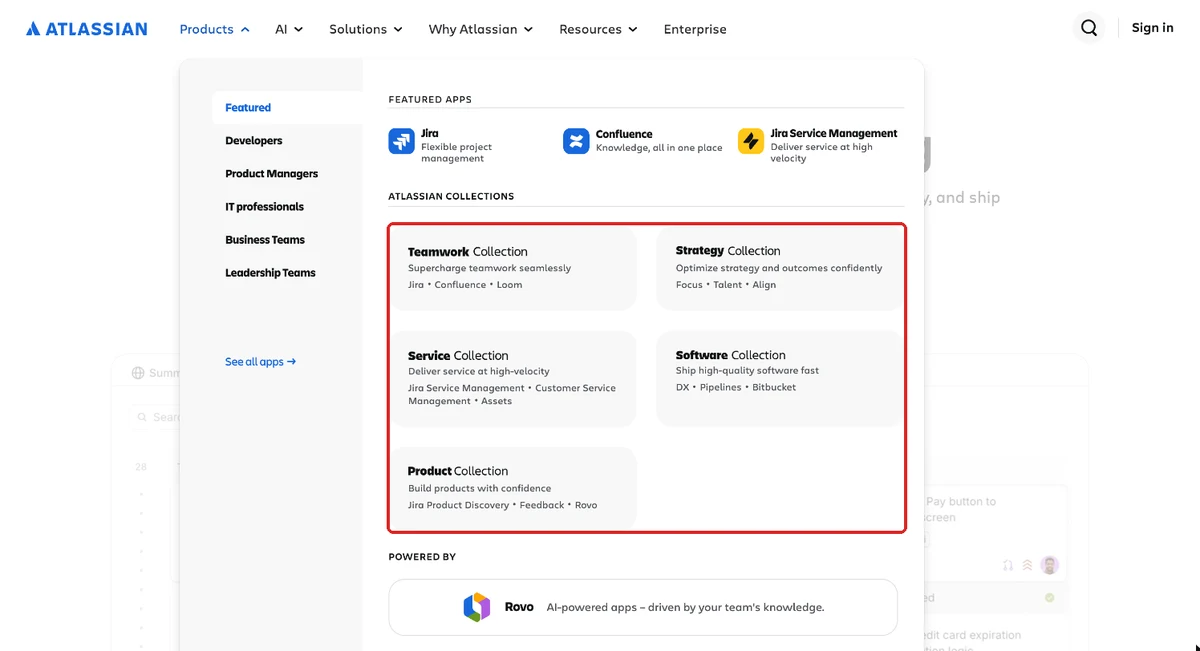
Take just one of them, Jira Service Management, and here’s what that looks like:
| Page type | Jira Service Management’s page |
|---|---|
| Comparison | Jira Service Management vs ServiceNow |
| Integration | Atlassian & Okta integration, plus the apps on the Atlassian Marketplace |
| Security | SOC 2 compliance page |
| Pricing | Service Collection pricing for Jira Service Management |
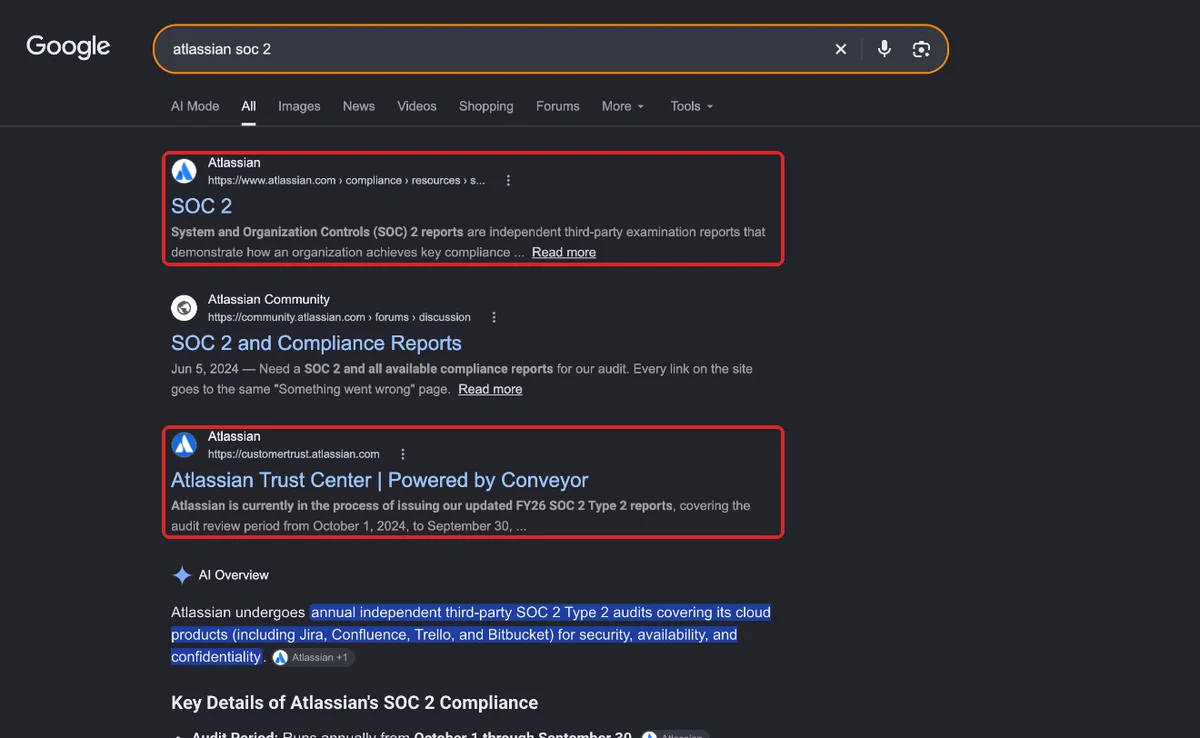
The pages teams miss most are integration pages, public docs and security and compliance pages. When an engineer searches for your integration with their identity provider or CRM, they should find a docs page that’s indexable and links back to the product, and when a security reviewer searches for your SOC 2 report, they should land on your own page.
Atlassian gets this right: search “atlassian soc 2” and its compliance page ranks first, with its Trust Center third, so the answer comes from Atlassian itself and not a forum thread.
Give every page one job and one cluster to go after. And when two product lines start competing for the same search, decide which page owns it and point the other one there.
Step 5: Fix Technical SEO Across Every Site and Subdomain
Crawl and fix every site and subdomain together, meaning the marketing site, the app’s public pages, the docs, the help center and any regional sites, because they often run on different stacks and a fix on one doesn’t carry over to the rest.
These are the problems we run into most on enterprise SaaS sites:
- Template errors: one wrong canonical or noindex in a shared template copies across thousands of pages before anyone notices.
- JavaScript-rendered pages: marketing and app pages built in React or Next.js can show Google an empty page if server-side rendering isn’t set up.
- Disconnected subdomains: docs and help centers often earn links from developers but don’t link back to the product pages, so none of that authority reaches the pages that sell.
- Regional sites: missing or broken hreflang means the wrong country’s page shows up, or the regional pages compete with each other.
- Parameter and filter URLs: tracking parameters and filtered views create thousands of URLs that eat into crawl budget.
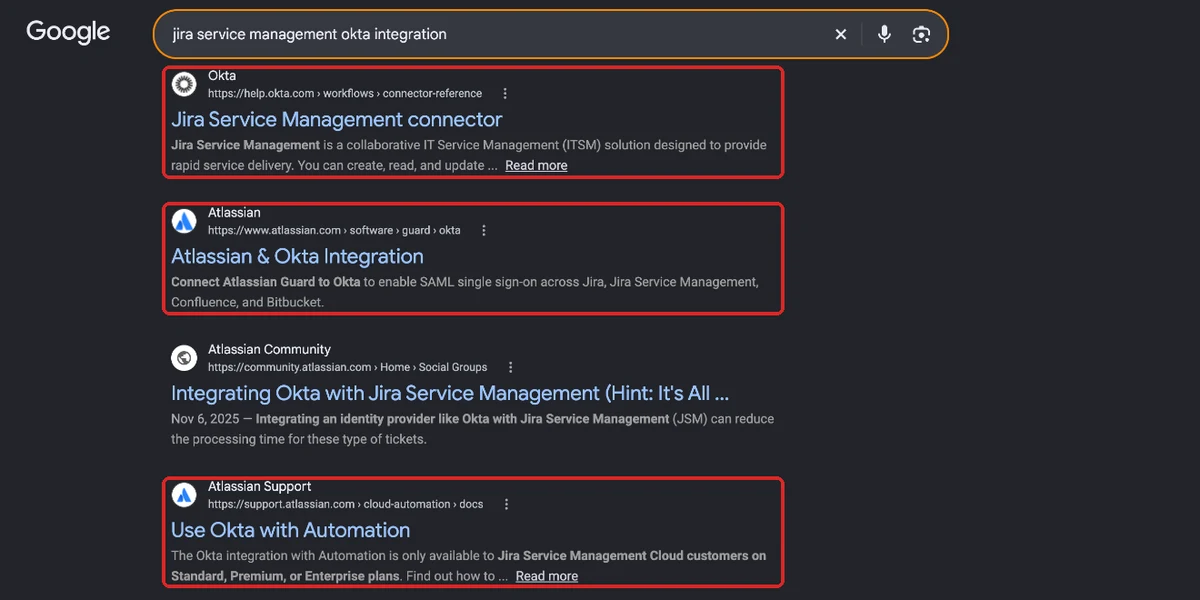
You can see why docs matter in a search like “jira service management okta integration”. Okta’s own connector docs rank first, and Atlassian’s integration page and its support docs rank second and fourth, so the docs are doing as much work as the marketing page.
Step 6: Create Content for Each Stage, Starting With Bottom-of-the-Funnel
Content should start at the bottom of the funnel, with comparisons, alternatives, integrations and implementation questions, because that’s where the buying committees already in a deal are searching.
We learned this one the hard way with an enterprise client:
- What we did first: went after the higher-volume bottom-of-the-funnel keywords and published content built for traffic.
- What happened: traffic went up, pipeline didn’t, and the leads weren’t qualified.
- What we changed: we stopped asking “what gets the most searches?” and started asking “what does someone search when they already have the problem and need it fixed now?”, which took us to implementation problems, scaling issues and operational bottlenecks.
- The result: most of those topics had close to zero search volume, but the people searching them were decision-makers, and the client went from 3 sales opportunities to 15 in two quarters without any extra budget.
Some of those pages got 5 to 10 visits a week, and that was fine, because in enterprise SaaS one visitor who’s already in a buying process is worth more than thousands who aren’t.
So for each product, build in this order:
- comparison and alternatives pages for the competitors you meet in deals
- integration and implementation pages for the tools your buyers already use
- use-case and industry pages for your main segments
- guides and research at the top, once the pages that convert are live
Step 7: Build Authority Through Research, Partners and Analysts
At enterprise scale, authority comes from sources your competitors can’t copy, like your own product data, your partner ecosystem and analyst coverage, because one-off outreach won’t move rankings for competitive enterprise terms.
These four work best, shown here for the service desk product:
| Source | Example | Why it works |
|---|---|---|
| Original research | A yearly “State of IT Service” report from anonymized ticket data, like HubSpot’s State of Marketing report | Publications and analysts cite it every year, and nobody else has the data |
| Partner and marketplace listings | A listing on the Okta Integration Network and the Atlassian Marketplace, plus an integration guide written with each partner | Partners link to it from pages your buyers already visit |
| Analyst relations | A complete Gartner Peer Insights profile in the ITSM category, and a briefing with the analysts who cover ITSM | Enterprise buyers and AI tools both lean on analyst coverage |
| Digital PR | Your CIO’s take on AI in IT support in a publication like CIO.com | Coverage in what your buyers read, with links from sites Google trusts |
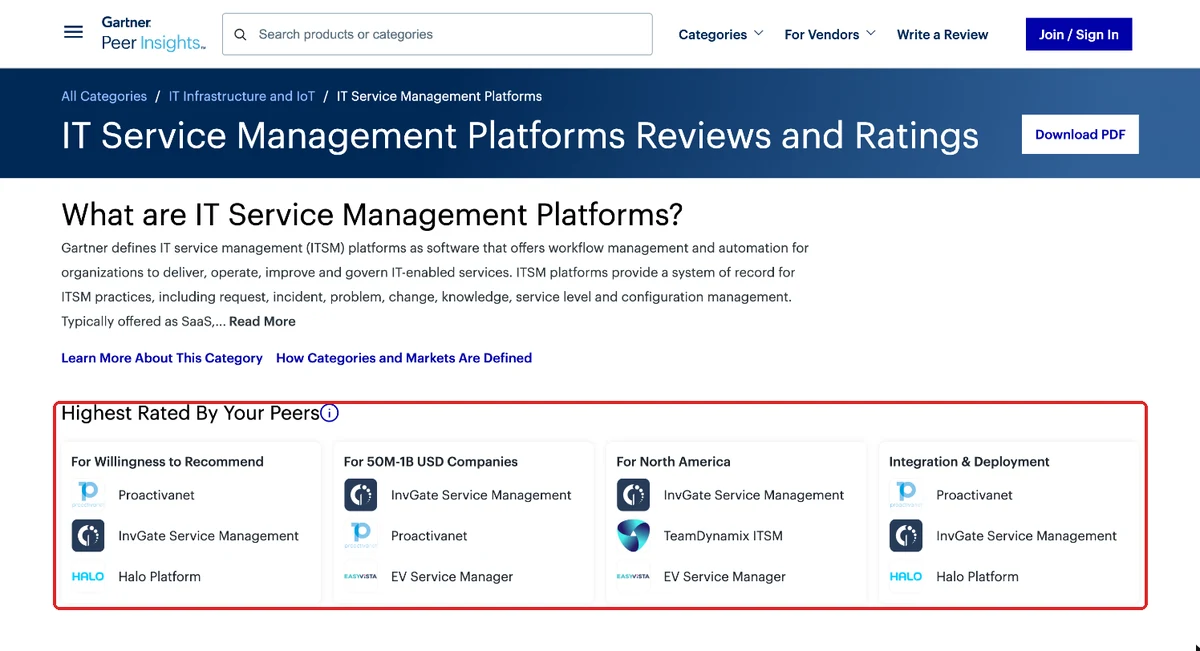
This is the kind of page analyst relations gets you onto. Gartner Peer Insights ranks ITSM platforms by peer reviews, broken down by company size and region, and enterprise buyers check it before they shortlist.
Step 8: Make Sure AI Search Names You
AI search tools now help build shortlists for enterprise buyers, so make sure ChatGPT, Perplexity and Google’s AI Overviews name you for your category, by keeping your product facts consistent everywhere and answering buyer questions directly on your pages.
For enterprise software, the sources AI tools lean on are usually the same ones procurement checks, like G2, Gartner, analyst reports and your own security and pricing pages. So if your product description says one thing on your site and something else on G2, AI tools have to guess, and they’ll either leave you out or describe you wrong.
Here’s that in practice. For “best enterprise itsm software”, Google’s AI Overview cites Gartner Peer Insights in its very first line and lists it as the first source, and the same Gartner page ranks first in the results underneath.
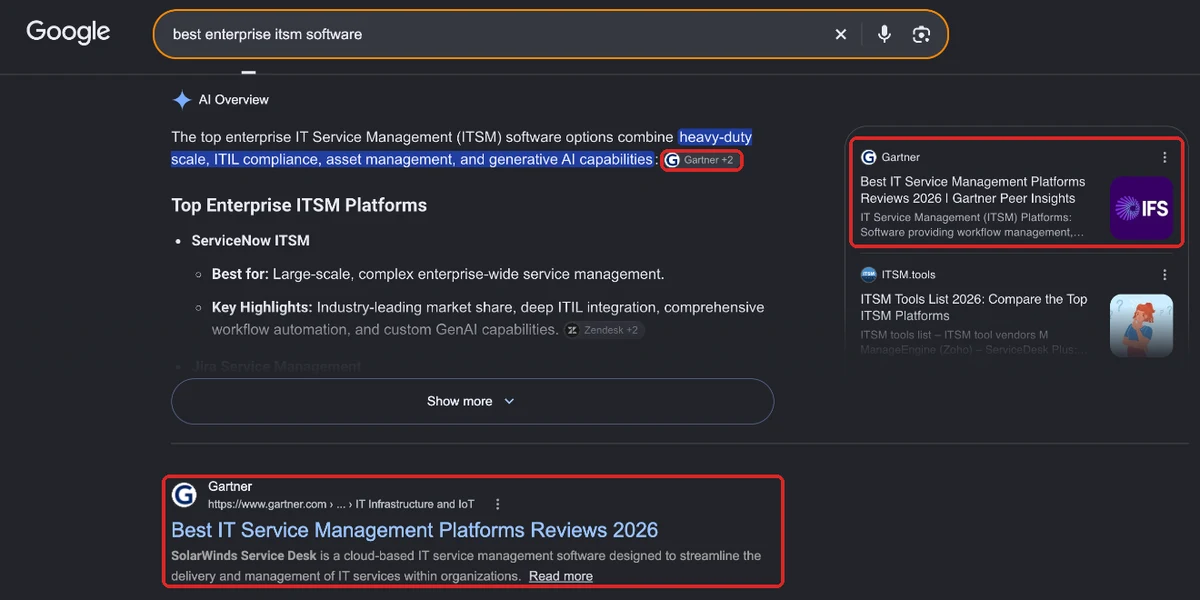
Start by running the questions your buying committee asks through ChatGPT and Google, and write down who gets named and which sources get cited.
How Do You Measure Enterprise SaaS SEO?
Measure enterprise SaaS SEO in pipeline: how much pipeline organic search sources, how much more it influences, how much ARR it brings in and what it costs compared with paid, plus how often AI tools name you.
The way I put it to clients is, stop chasing traffic and start chasing signals. In enterprise SaaS, the job is answering the questions a buying committee asks, and then feeding those signals, like who visited, which pages and how often, into lead scoring and sales.
| Metric | Where it lives | What good looks like (service desk example) |
|---|---|---|
| Organic-sourced pipeline | CRM, first touch | $400K a quarter growing to $600K within a year |
| Organic-influenced pipeline | CRM, any touch | Organic touched 6 of every 10 closed-won deals |
| SEO-sourced ARR | CRM, closed-won | $250K of new ARR this year from organic-sourced deals |
| Organic CAC vs paid CAC | Finance and CRM | $9,000 per customer from organic, against $14,000 from paid |
| Sales-cycle length | CRM | 75 days for deals that touched organic content, against 95 for the rest |
| AI mentions and citations | AI tracker, Search Console, Bing Webmaster Tools | Named in 6 of the 10 category prompts, up from 2 |
Most enterprise teams undercount organic, because their attribution only credits the last touch. Here’s what each model shows you and what it leaves out:
| Attribution model | What it captures | What it misses |
|---|---|---|
| Last touch | The final touch before conversion | Every earlier organic visit |
| First touch | The first interaction with the brand | Everything after that first visit |
| Linear | Equal credit to every touch | Which touches actually mattered |
| Pipeline-influenced | Any deal where organic was a touch | How much organic did in each deal |
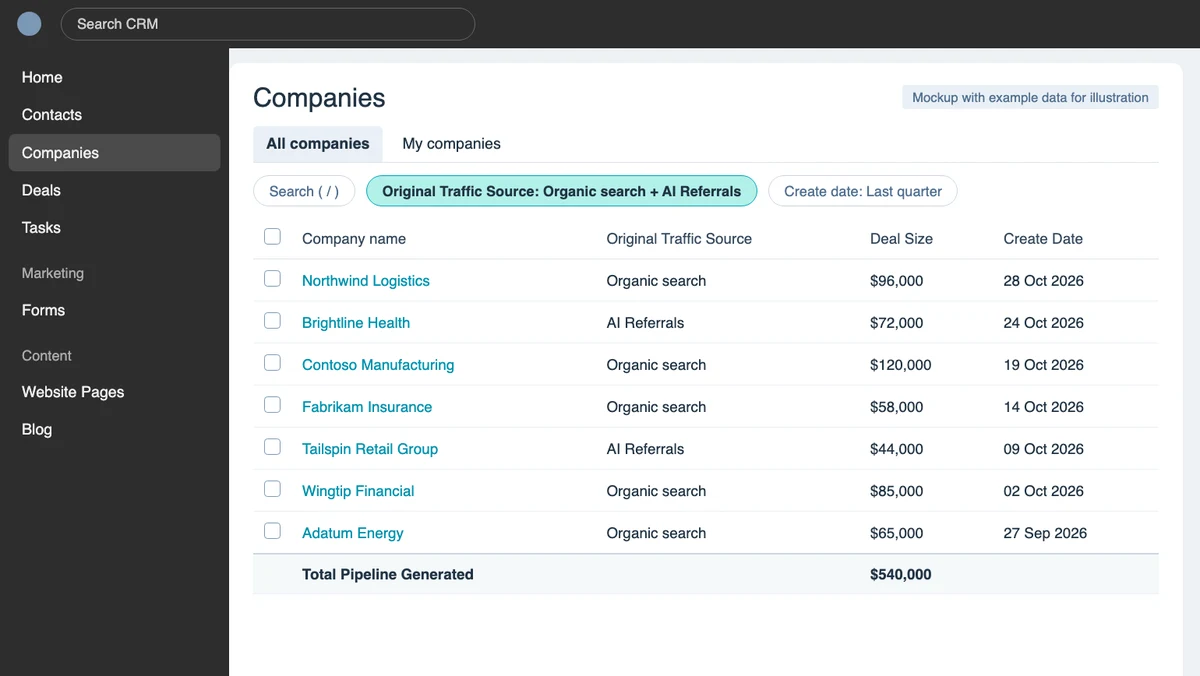
Here’s a simple way to see it in your CRM: filter companies by original traffic source to organic search and AI referrals, add deal size as a column, and the total at the bottom is the pipeline those two channels started. It’s a mockup with example companies and numbers.
What Does a 90-Day Enterprise SaaS SEO Roadmap Look Like?
A 90-day enterprise SaaS SEO roadmap spends the first month on targets, governance and the template-level technical fixes, starts rolling out content from the second month with bottom-of-the-funnel pages, and uses the third month for whatever the first two show.
| Days | What you do | What you should have at the end |
|---|---|---|
| 1 to 30 | Set pipeline targets per product, agree owners and approval paths, crawl every site, map the buying committee, fix the template-level technical issues | Targets in the CRM, a shared backlog, the biggest technical fixes live, a page plan |
| 31 to 60 | Start publishing, beginning with comparison, alternatives and integration pages, and link docs back to product pages | The first bottom-of-the-funnel pages live and indexed |
| 61 to 90 | If traffic is coming in, move to CRO on those pages, AI visibility and PR. If it isn’t yet, publish more pages and optimize the ones already live | Either a first pipeline view by product, or a bigger set of pages getting indexed and picked up |
Don’t expect pipeline in the first 90 days. What you’re doing here is getting the system working, so the pages that come after get approved, shipped and measured without that two-month wait.
How Do You Tackle Common Problems in an Enterprise SaaS Company for SEO?
The problems that slow enterprise SaaS SEO down are mostly internal: pages stuck in approval, engineering treating SEO tickets as low priority, product lines competing for the same searches, organic getting no credit for pipeline, and brand or legal edits that water pages down. Here’s how to handle each one.
Pages Stuck in Approval for Months
This is the one from Step 2, where a set of competitor pages took two months to go live and almost none of it was SEO work. It happens because every page goes through legal, brand and product one at a time, and each team has its own priorities.
Fix: get page types approved once (comparisons, alternatives, integrations), agree a review deadline with each team, and keep a template that’s already been through legal, so new pages only need a quick check.
Engineering Puts SEO Tickets Last
Engineering plans its work around product releases, so a ticket that says “fix canonicals on the docs” loses to almost anything else.
Fix: turn SEO work into a few template-level tickets with a clear number on each one, like how many pages it fixes and which pipeline pages it affects, and get them into the sprint planning engineering already does. One fix to a template that touches thousands of pages is a much easier ask than a hundred small ones.
Product Lines Competing for the Same Searches
When two product teams both publish on the same topic, their pages end up competing and neither one ranks well. It usually shows up in Search Console as two URLs swapping positions for the same queries.
Fix: decide which product owns each topic in the keyword map from Step 4, then merge the weaker page into the stronger one with a 301 redirect, or rewrite it so it goes after a different search.
Organic Gets No Credit for Pipeline
If your CRM only credits the last touch, organic looks small even when it shows up in most deals, and that makes the budget hard to defend.
Fix: set up first-touch and pipeline-influenced reporting with RevOps (see the measuring section above), and share the numbers by product every month, so leadership sees what organic is actually doing.
Brand and Legal Edits Water the Pages Down
A comparison page that’s been through three rounds of review often ends up too vague to answer the buyer’s question, and then it doesn’t rank or convert.
Fix: agree up front what a comparison or alternatives page needs to say to be useful, like real pricing, honest trade-offs and named competitors, and get that approved as part of the page type, so reviews only check the facts.
Should You Build In-House, Hire an Agency, or Both?
For enterprise SaaS SEO, most companies work with an agency, where the in-house team sets the targets, approves the strategy the agency puts forward and keeps track of performance over time.
I’ve worked in-house, worked with agencies and now run one, so these are the averages I’ve seen from all three sides:
| Model | What you get | Costs involved per month | Typical cost per month | Best for |
|---|---|---|---|---|
| In-house | A manager, individual contributors and tools | Salaries for an SEO manager and specialists, plus tool licences | $10,000 to $15,000 | Companies that can hire senior SEO, content and technical people |
| Agency | Full outsourcing, with one point of contact | One monthly retainer | $3,000 to $7,000 | Most enterprise SaaS teams |
| Hybrid | One or two SEOs or marketers working with an agency | One or two salaries plus a smaller retainer | $7,500 to $10,000 | Teams that already have one or two SEOs and need more hands |
Whichever way you go, the in-house side needs someone who can get things approved. An agency can write the pages and fix the templates, but it can’t sit in the product, legal and engineering meetings for you.
How PipeRocket Does Enterprise SaaS SEO
We run enterprise SEO for SaaS companies with several products and long sales cycles, and we start with pipeline targets and approval paths before any keyword work. If your SEO program isn’t showing up in your pipeline report, we’ll show you where the pipeline is being lost and what to fix first.
Frequently Asked Questions
What is enterprise SaaS SEO?
It’s the practice of scaling SEO for large software companies with thousands of pages, several product lines, regional sites and long sales cycles with several stakeholders. It ties organic and AI search visibility to pipeline, lower acquisition cost and revenue, and it depends on governance across product, legal and engineering as much as on keywords.
How do you do enterprise SaaS SEO step by step?
Set pipeline targets per product line, agree who approves what, map the buying committee, plan the pages every buying stage needs, fix technical SEO across every site and subdomain, build bottom-of-the-funnel content first, earn authority through research, partners and analysts, and make sure AI search names you.
What’s the difference between enterprise SaaS SEO and enterprise SEO?
Enterprise SEO covers any large website, from ecommerce to publishers, whereas the SaaS version is specific to software companies, with buying committees, several product lines, integration and security pages, and pipeline and ARR as the goal. Our enterprise SEO guide covers the general version, including enterprise SEO platforms.
How do you handle SEO across multiple product lines without cannibalizing rankings?
Give each product line its own keyword map and page plan, and decide up front which page owns each search when two products overlap. If two pages still end up competing, merge the weaker one into the stronger one with a 301 redirect, or rewrite one of them so it goes after a different search.
How much does enterprise SaaS SEO cost?
It usually costs $3,000 to $7,000 a month with an agency, $10,000 to $15,000 for an in-house team, and $7,500 to $10,000 for a hybrid, depending on how many products and sites are involved, how much content you need and whether link building is included. The number to watch is organic CAC against paid CAC, because that’s what tells you whether the program is paying for itself.